

IFRS Reserve
Implementation of IFRS Accounting
What is IFRS?
International Financial Reporting Standards (IFRS) are a set of standards developed to unify and standardize financial reporting. Their main purpose is to ensure transparency, comparability, and reliability of financial information for all stakeholders, including investors, creditors, and regulators.
The IFRS 9 "Financial Instruments" standard was introduced to replace the previous IAS 39 standard. It aims to improve the quality of financial reporting and more accurately reflect the risks associated with financial assets.
Bank of Russia Regulation and IFRS Reserve Requirements
Bank of Russia Regulation No. 605-P dated 01.10.2017, which came into force on 01.01.2019, introduces new requirements for accounting income on financial assets and assessing impairment reserves in accordance with the IFRS 9 standard.
The IFRS reserve is used to disclose financial information in accordance with international standards. Its calculation is based on the Expected Credit Losses (ECL) model.
Stage 1: Financial assets with low credit risk.
- Losses are assessed for a period of up to 12 months.
- Applied to assets that do not demonstrate significant deterioration in credit quality.
Stage 2: Financial assets with increased credit risk.
- Losses are assessed for the entire life of the asset.
- Transition to this stage occurs when significant deterioration in credit quality is identified.
Stage 3: Implemented losses.
- Applied to assets that have defaulted or have a significant reduction in the probability of repayment.
Changes in Legislation
Bank of Russia Directive No. 5807-U dated 28.04.2021:
- Criteria for transitions between provisioning stages have been clarified.
- New requirements for calculating expected credit losses (ECL) have been introduced.
Order of the Ministry of Finance of Russia No. 107n dated 16.08.2022:
- Additional requirements for disclosure of reserve information in financial statements have been established.
Note: This document describes the logic of IFRS reserve calculation in the Brainysoft system.
IFRS Reserve Calculation Methodology
The IFRS reserve calculation methodology is based on the following principles:
- Accountant's judgments provided by the company.
- Algorithm configuration is performed by Brainysoft.
IFRS Reserve Rate Calculation
The IFRS reserve rate is calculated through the Decision Making System (DMS). The DMS defines the conditions for determining the loan category and assigning the rate. Settings are configured by Brainysoft technical support.
Constant Settings
Before starting the reserve calculation, you need to check the constant settings. To do this, follow these steps:
- Go to the Admin – User Constants panel in the main menu.
- Make sure the settings match the following parameters:
| Parameter | Description | Default Value |
|---|---|---|
| Include discount in the accrual base for IFRS reserve calculation | When calculating the discount, the discount amount will be taken into account. The value is selected at the company's discretion. | NO |
| Calculate IFRS reserve | Enable/disable IFRS reserve calculation. | YES |
| DMS scheme ID for calculating IFRS reserve rate by contract | DMS ID used for calculating the IFRS reserve rate. Configuration is performed by technical support. | null |
Important: If the Calculate IFRS reserve parameter is set to NO, the IFRS reserve will not be accrued.
IFRS Reserve Accrual
IFRS reserve calculation occurs in two stages:
Stage 1: IFRS Reserve Rate Calculation
- Go to the Admin – Complex Processes panel in the main menu.
- Perform the following actions:
- Select process type: Reserve Rate Calculation.
- Specify the operation date.
- Specify the operation time (preferably closer to the end of the day).
- Click the Select Contracts button.
- Click Start "IFRS Reserve Rate Calculation" Process.


Result: The process will be run for all contracts in the database. After the calculation is complete, the rate will be recorded in the contract.
Stage 2: IFRS Reserve Calculation
- Go to the Admin – Complex Processes panel in the main menu.
- Perform the following actions:
- Select process type: IFRS Reserve.
- Specify the operation date.
- Specify the operation time (preferably closer to the end of the day).
- Click the Select Contracts button.
- Click Start "IFRS Reserve" Process.
Result: The process will be run for all contracts in the database. Reserve accrual operations will be created for the contracts. Operations are displayed in the Additional Contract Information block.
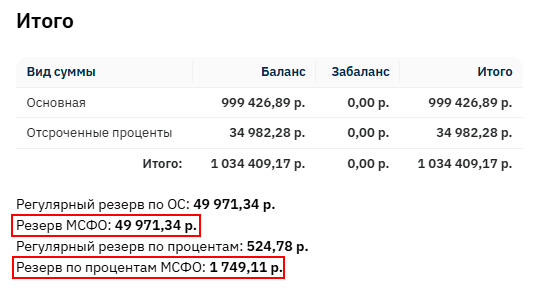
Note: This process is usually run on the last day of the month or once a quarter.
Additional Materials
For more detailed study of the topic, you can watch the webinar on Creating IFRS Reserves.
Recommendations
- Check constant settings:
- Make sure all constant parameters are configured correctly and the correct decision making system ID is specified.
- Contact technical support:
- If you have questions about DMS configuration or reserve calculation, contact Brainysoft technical support specialists.
Conclusion
IFRS reserve calculation is an important stage in accounting for financial assets and their impairment. The Brainysoft system provides convenient tools for automating this process, including constant configuration, rate calculation, and reserve accrual. By following the described steps, you will be able to correctly configure and use the system functionality for IFRS reserve calculation.