

Basic - Repayment of Customers in Arrears
This report displays (groups) information on repayments by customers who are in arrears at the time of debt payment by the number of days overdue.
This instruction will show a breakdown of records and fields of the "Repayment of Customers in Arrears" report for a period. To get the report, you need to generate it, i.e., select in the taskbar "Report" - "Basic" - "Repayment of Customers in Arrears", specify the period, if necessary select the appropriate filter, click the "generate" button. Then select from the list of generated reports and download it to your PC.
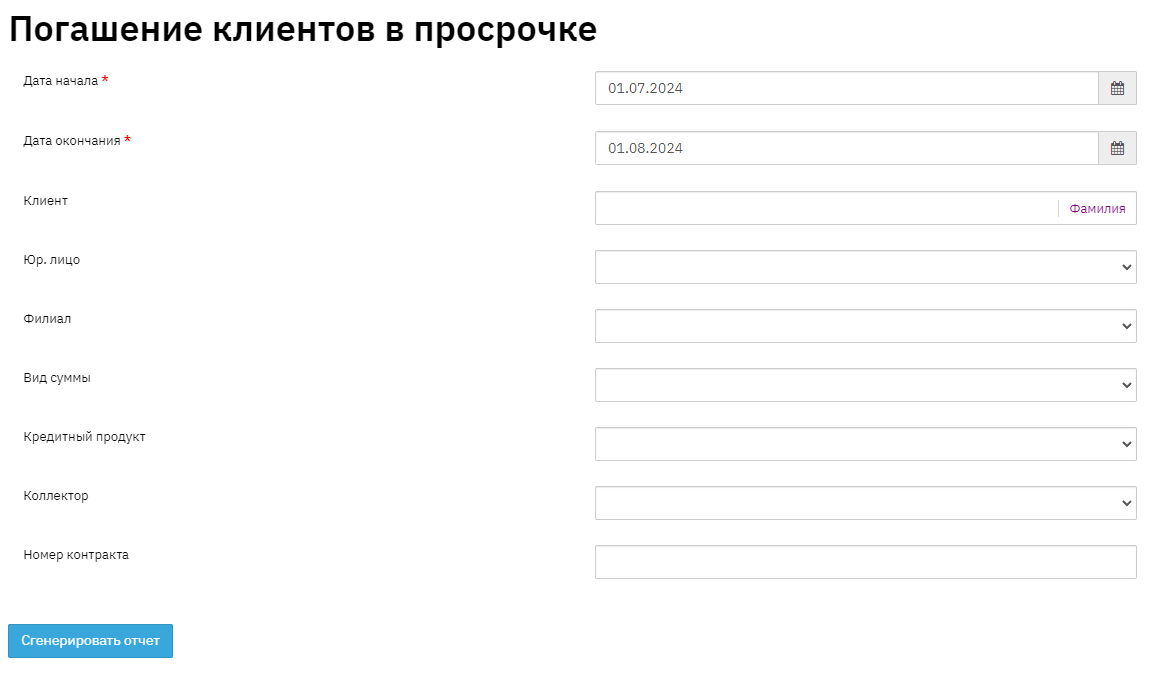
By using the filter when generating the report, you can achieve the desired result. The report can be generated:
by specific client
by specific legal entity
by specific branch
by specific amount type
by specific loan product
by specific collector
by specific contract
Below is an example of the report generated without a filter:

The "No." field displays the sequence number in the report list.
The "Repayment Date" field shows the date of payment under the contract. This information is displayed in the "Contract" - "Financial Information" - "Payments" section.
The "Full Name" field displays the borrower's personal information. This information is displayed in the "Contract" section.
The "Contract Number" field shows the unique sequence number of loan contracts. This information is displayed in the "Contract" section.
The "Number of Days Overdue" field shows the number of days overdue until the loan payment was made. This information is displayed in the "Contract" - "Financial Information" - "Overdue Tranches" section.
The "Number of Days Overdue 'by Status'" field shows the number of days overdue (by status) until the loan payment was made. The date of becoming overdue can be seen in the "Contract" - "Financial Information" - "Status History" section.
The "Repayment Amount" field shows the repayment amount. This information is displayed in the "Contract" - "Financial Information" - "Payments" section.
The "Outstanding Balance" field shows the remaining debt amount. This information is displayed in the "Contract" - "Financial Information" - "Total" section.
The "Loan Product" field shows the loan product. This information is displayed in the "Contract" - "Request" section.
The "Collector" field shows the Collector's data. This information is displayed in the "Contract" - "Additional" section.