

Basic - Active Loans
Report with portfolio data as of a specified date (Balances for all types of client debts: Principal, accrued but unpaid interest, penalties, fees, prepayments made (Prepayment).
The report includes information on Active Loans as of the specified date.
Brainysoft software considers Active Loans as loans that have a balance on Principal or Interest at the time of report generation.
All report elements are interconnected. Below we will examine the elements and fields of the "Active Loans" report as of a specified date.
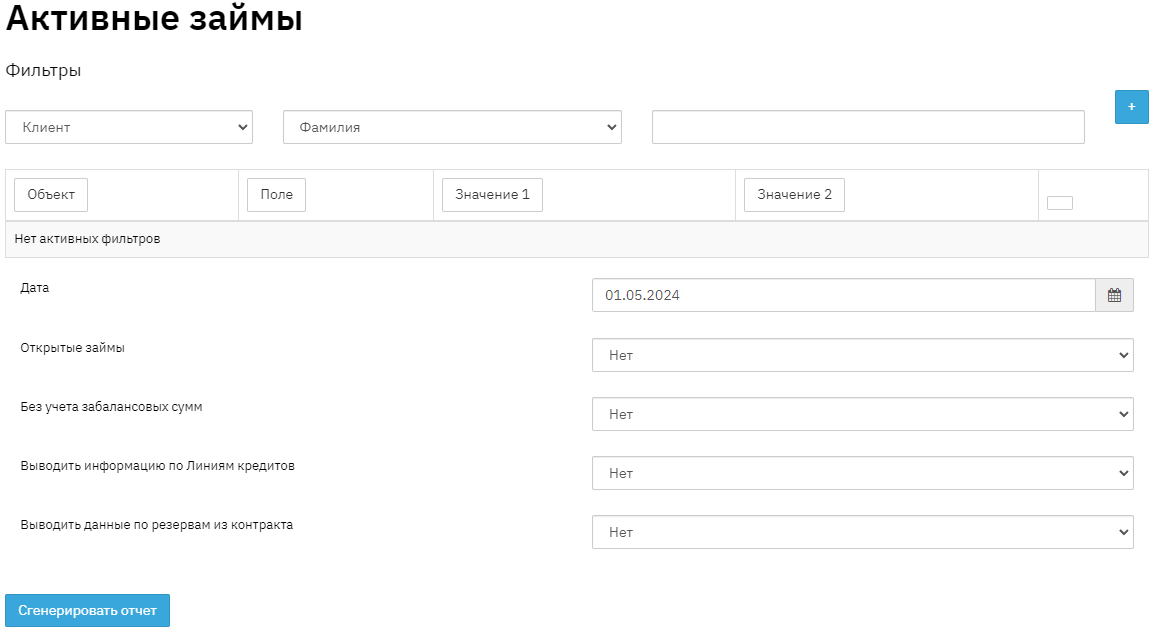
To generate the report, navigate to "Report" - "Basic" - "Active Loans", set the date, select the appropriate filter if necessary, and click the "Generate" button. Then select from the list of generated reports and download it to your PC.
When generating the report, you can use filters that need to be set before generating the report. Selection can be made based on values from the contract, application, client profile, and operation. As an example, let's consider applying a filter by last name:
And below is the report generation without a filter:

The report can also be generated in different modes:
If the "Exclude off-balance sheet amounts" field is set to - YES, the report will be generated without amounts that are off-balance sheet.
If the "Open loans" field is set to - YES, the report will be generated with open loans. Open loans are loans where the Balance sheet amount of Principal and Interest equals 0, but there is a balance sheet remainder for other types of amounts. The report contains:
- Field "No." this field displays the sequential number in the report list.
- Field "No. by gr." this field displays the sequential number in the report list.
- Field "Region" this field displays the name of the region where the loan was opened. Data is pulled from the Branch directory, Region field.
- Field "Branch" this field displays the name of the branch where the loan was opened. An organization may have several branches, accordingly, the report will include the branch where the loan was opened. A branch is a grouping of subdivisions by territorial feature. This information is filled in when creating a Contract in the "Request" section. Let's consider an example: An organization has 3 loan issuance points in the city of Odintsovo. The city of Odintsovo will be the branch, and the 3 issuance points will be the subdivisions.
- Field "Subdivision" this field displays the name of the subdivision where the loan was issued. An organization may have several subdivisions, accordingly, the report will include the subdivision where the loan was opened. In the program, any issuance point is considered a subdivision. This information is filled in when creating a Contract in the "Request" section.
- Field "Funding Source" this field indicates the origin of funds from which the loan is issued. This information is filled in when creating a Contract in the "Request" section.
- Field "Client" this field displays the full name of the borrower. This information is displayed in the "Contract" section.
- Field "Contract" this field indicates the unique sequential number of credit contracts. This information is displayed in the "Contract" section.
- Field "Issue Date" this field displays the loan issue date. This information is displayed in the "Contract" section.
- Field "Last Repayment Date" this field displays information about the date of the last payment. This date is taken from the planned schedule, which is formed when the loan is issued. This information is displayed in "Contract" - "Financial Information" - "Schedules".
- Field "Last Accrual Date" this field displays the date of the last operation on the contract. This information is displayed in the "Contract" - "Financial Information" section.
- Field "Interest Rate" this field displays information about the loan interest rate. This information is displayed in the contract in the "Request" section.
- Field "Number of Tranches" this field indicates information about the number of installments from the credit product, i.e., the loan term. This information is displayed in the "Contract" - "Request" section.
- Field "Number of Grace Periods" this field displays information about loan grace periods. In the credit product settings, you can configure grace tranches, and there is also an option to select the interest accrual method – residual with grace tranches.
- Field "Loan Amount" this field displays information about the loan amount. This information is displayed in the "Contract" - "Request" section.
- Field "Principal Balance" this field displays information about the remaining principal loan amount that the client must pay to repay the loan. This information is displayed in the "Contract" - "Financial Information" - "Total" section.
- Field "Interest Balance" this field displays information about interest payable at the time of report generation. This information is displayed in the "Contract" - "Financial Information" - "Total" section.
- Field "Penalty Balance" this field displays information about the total amount of all accrued penalties at the time of report generation. (Penalty, Penalty on Interest, Late Payment Penalty, Fee Penalty, Interest on Overdue Principal, Deferred Penalties). This information is displayed in the "Contract" - "Financial Information" - "Total" section.
- Field "Fee Balance" this field displays information about the total amount of all fees, configured in the Credit Product directory. This information is displayed in the "Contract" - "Credit Product" section.
- Field "State Duty Balance" this field displays information about the state duty amount. This information is displayed in the "Contract" - "Financial Information" - "Total" section.
- Field "Principal Prepayment Balance" this field displays information about the prepayment amount for the principal. When making a payment larger than the scheduled payment, the overpayment is recorded as prepayment for Principal. This information is displayed in the "Contract" - "Financial Information" - "Total" section. The repayment order of the deposited amount is specified in the "Contract" - "Credit Product" - "Prepayment Offset Method" section.
- Field "Interest Prepayment Balance" this field displays information about the prepayment amount for interest. When making a payment larger than the scheduled payment, the overpayment is recorded as prepayment for interest. This information is displayed in the "Contract" - "Financial Information" - "Total" section. The repayment order of the deposited amount is specified in the "Contract" - "Credit Product" - "Prepayment Offset Method" section.
- Field "Discount Balance" this field displays information about the discount amount on the contract. Discount is the sum of future (expected) cash payments to the current point in time. Data can be viewed in the "Contract" - "Financial Information" - "Total" section.
- Field "Regulatory Reserve Balance for Principal" this field displays information about the regulatory reserve amount for Principal. Regulatory reserve is the reserve fund amount created by the organization to cover its potential losses on Principal. Data can be viewed in the "Contract" - "Financial Information" - "Total" section.
- Field "Regulatory Reserve Balance for Interest" this field displays information about the regulatory reserve amount for interest. Data can be viewed in the "Contract" - "Financial Information" - "Total" section.
- Field "IFRS Reserve Balance" this field displays information about the IFRS reserve amount for the loan. IFRS reserve is the reserve amount that corresponds to the calculation of the International Financial Reporting Standard. Data can be viewed in the "Contract" - "Financial Information" - "Total" section.
- Field "Loan Type" this field displays information about the loan type. Currently, the program has 2 loan types: short-term – a loan up to 364 days and long-term – a loan over 364 days. The loan type is determined automatically.
- Field "Contract Status" this field displays information about the current contract status at the time of report generation. Contract statuses can be as follows: normal, overdue, restructured, restructured overdue. Data can be viewed in the "Contract" - "Financial Information" - "Status History" section.
- Field "Group" this field displays information about the name of the client group for a group loan. This value is filled in when creating a group agreement.
- Field "Group Agreement" this field displays information about the name of the group agreement.
- Field "Loan Specialist" this field pulls information about the loan specialist who created the contract. Data can be viewed in the "Contract" in the "Request" - "Loan Specialist" section.
- Field "Client Manager" this field pulls information about the last employee specified in the client monitoring. Data can be viewed in the client profile in the "Client" - "Service Information" section.
- Field "APR at Issuance" this field displays information about the APR interest rate, which is formed when the loan is issued. Data can be viewed in the "Contract" in the "Request" section.