

Summarized - Consolidated Cash Flow Report by Cash Registers
The report displays summary data on loan repayments by cash registers, broken down by received interest, received penalties, and issued loan amounts.
This instruction will demonstrate the breakdown of records and fields in the "Consolidated Cash Flow Report by Cash Registers" report as of the current date. To obtain the report, you need to generate it by selecting "Report" - "Basic" - "Consolidated Cash Flow Report by Cash Registers" in the taskbar, setting the period, selecting the legal entity and departments if necessary, and clicking the "Generate" button. Then select from the list of generated reports and download it to your PC.
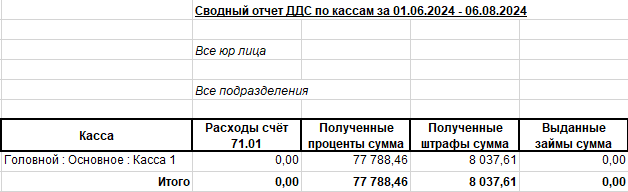
This report contains the following data:
- The "Cash Register" field displays the name of the cash register.
- The "Expenses Account 71.01" field displays the amount issued to the accountable person.
- The "Received Interest Amount" field displays the amount of repaid interest for the report generation period.
- The "Received Penalties Amount" field displays the amount of repaid penalties for the report generation period.
- The "Issued Loans Amount" field displays the amount of loans issued for the report generation period.