

Custom Contract Status
Custom contract status.
A directory that stores custom contract statuses. The directory allows companies to create a list of their own business statuses and assign these statuses to a specific contract directly by the user. Statuses are used for informational purposes or for convenient sorting and filtering in various reports.
Adding statuses to the directory.
To view the directory, navigate to "Directories" > "Custom Contract Status".

To add a new status, click the "Create" button, fill in the status name, and click "Save" to save:

Assigning a status to a contract.
To set a business status for a contract, you need to open the desired contract in View mode.

On the right side of the screen, there is a "Custom Contract Statuses" widget. The widget saves the history of previously assigned statuses, indicating the date of status assignment, the status, and the user who set the status.
To add a new status, click the "New Status" button.
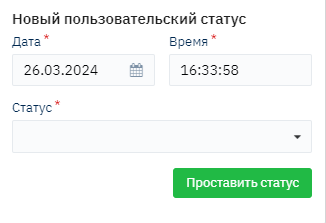
Select the desired status from the list, specify the date and time of the status if necessary (defaults to current time), and click the "Assign Status" button. The status will be added to the history.
These statuses have no effect on the contract lifecycle and are purely informational.