

Analytical - Provisions
Asset classification, reserve creation, provisions in Brainysoft.
If you have a loan portfolio, there is naturally a desire to know what assets are included in this portfolio. When classifying its portfolio, an organization relies on what collateral is available and whether there is any collateral at all for a loan included in the portfolio assets, what the client's current financial position is, and also relies on the number of days overdue. To classify your portfolio, you need to use the following directories in the program:
Overdue degrees, types of financial position, loan categories, and asset classification by points.
Asset classification by points – this directory stores a specific classification based on points accumulated from the loan contract, meaning a certain classification is assigned to the loan from this directory, for example: Doubtful 1st category, Standard, etc.

To add or modify data for a new classification, click the "Add" link. In the new classification, fill in the classification name, point range, and provision rate. To save, click the "Save" button.
To determine the classification, all points from three related directories are summed:
- Loan categories
- Types of financial position
- Overdue degrees
1) Loan categories – reflects loan collateral. This directory lists the categories and assigns points depending on whether the loan category is positive or negative, used for asset classification and provision calculation.

2) Types of financial position – a directory that reflects types of financial and material position of the client, which are used when creating a new loan application.
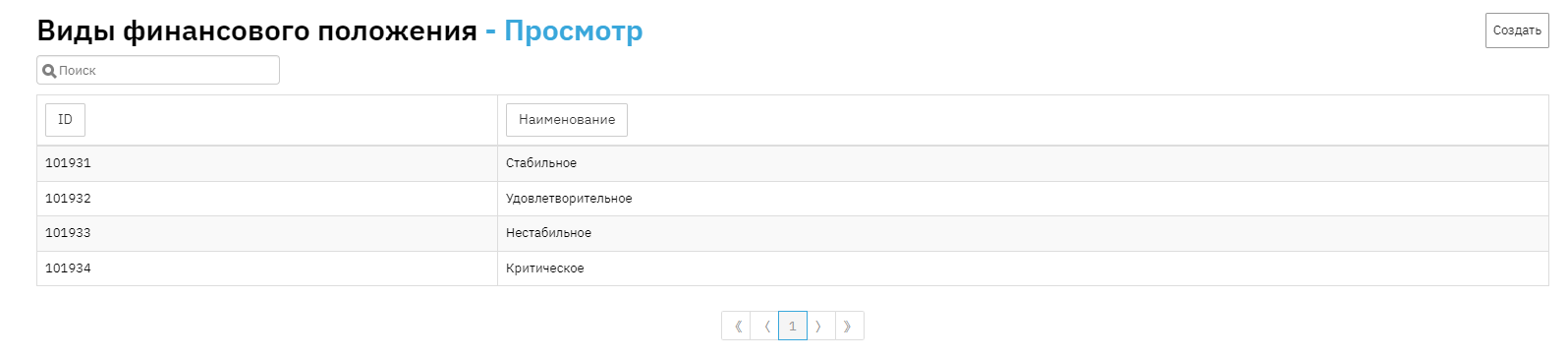
New values are not added, as these values were approved by the FSA. You can fill in points for each position according to the organization's calculations in edit mode.
3) Overdue degrees – a directory used in asset classification, designed to store point values for different overdue periods for Principal debt and interest arrears, used as a source of information for generating the Provisions report. To add a new value, click the "Add" button:

In the new element, select the risk criterion (Principal overdue, Interest overdue), overdue periods in days, and the corresponding points. To save the new element, click the "Save" button.
What are Reserve and Provision?
You know that you have an asset in the form of a loan portfolio, but there is no guarantee that all loans will be repaid on time or will be repaid at all. For this purpose, the organization creates a reserve.
Reserve – is a balance sheet balance in an account. A reserve is created to cover losses; the larger the portfolio (money in clients' hands), the higher the risk that not all loans will be repaid.
To create it, you need to make a journal entry. The amount of the journal entry for creating or adjusting the reserve is called a provision.
Provision in the program – is a report that shows loan classification according to FSA rules, reserve at the beginning of the period, changes in loan status during the period, reserve at the end of the period, and provision broken down by contracts and in summary mode.
How to create a "Provisions" report?

If you generate the report in collapsed mode, this report will only show figures for the end of the period for the Active balance and Reserve amount for the active balance.
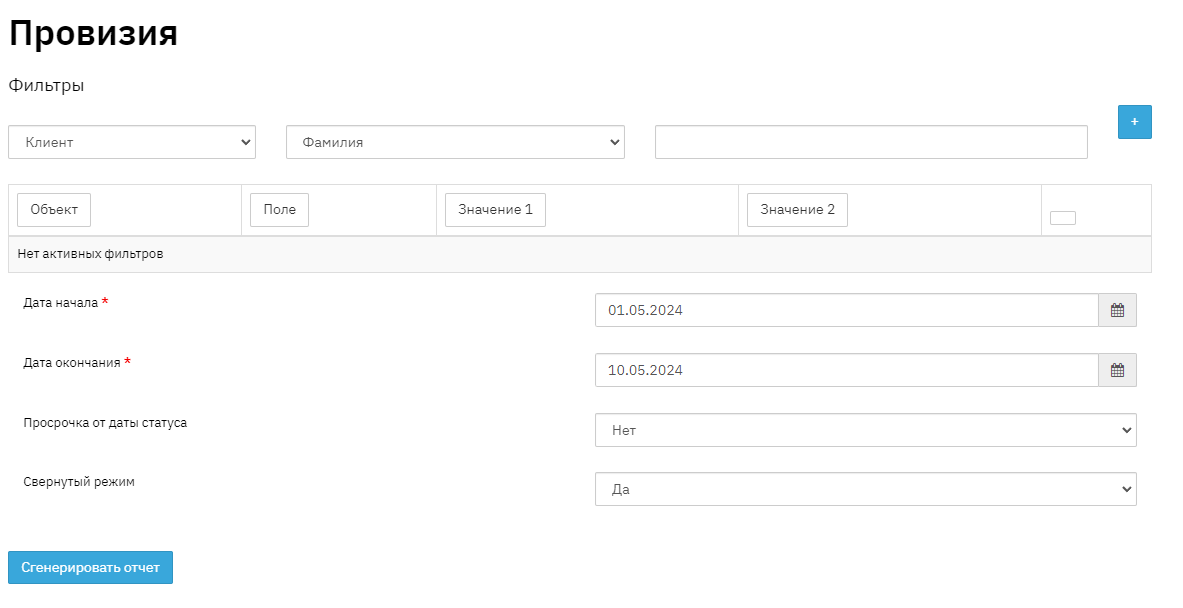
This is what the "Provisions" report looks like

How is portfolio classification reflected in the report and how are reserve and provision shown?
It is not enough to simply take the entire portfolio and accrue a reserve. You need to know what the portfolio risk is, for this we introduce asset classification. And for each classification, we accrue a certain percentage of reserve. For example, for the loan category - Individual without collateral, we accrue 10% reserve, for Legal entity without collateral - 30% reserve.
If a loan has moved to the Hopeless category and there is no way to recover the Principal amount, then this loan can be written off against the reserve.
Let's consider an example from the "Provisions" report. We set the period from January 1 to February 26, 2018. This report includes all contracts, both overdue and contracts with regular status (without overdue). The report also displays information about the Client's financial position, Collateral quality, and number of days overdue, and the number of days overdue for Principal and Interest are reflected in the "Overdue degrees" directory. Based on these parameters, points are summed, which is reflected in the "Total points at the beginning of the period" column.
"Provision rate at the beginning of the period, %" - this column displays data specified in the "Asset classification by points" directory
There are two methods for calculating "Reserve":
1 – If you take "Provision rate at the beginning of the period" and apply it to "Active Principal balance at the beginning of the period", you get "Reserve amount for active Principal balance at the beginning of the period".
2 – This method involves applying "Provision rate at the beginning of the period" to "Overdue Principal balance at the beginning of the period", which results in "Reserve amount for overdue Principal balance at the beginning of the period"
In columns showing provision amounts for active Principal balance or overdue Principal balance, the Provision amounts are shown, meaning the difference between the Reserve amount for active or overdue Principal balance at the beginning of the period and the Reserve amount for active or overdue Principal balance at the end of the period.
For example, if the Active Principal balance at the beginning of the period was N rubles, and the Provision amount for active balance was r rubles, then the accountant must make a journal entry to increase the Reserve amount for active Principal balance at the end of the period to get N+r.
This report is interactive, meaning it only exists in Excel. If you change data in the program, the report itself changes.
For management and financial accounting purposes, and for proper valuation of your assets, it is necessary to create a reserve.