

Basic - Cash Flow Control
This report contains information on cash flows during the working day. The report is generated for a period.
The report is used for:
- Verifying movement acceptance;
- Day closing.
To generate the report, go to "Report" - "Basic" - "Cash Flow Control", set the generation period, select the appropriate filter if necessary, and click the "Generate" button. Then select from the list of generated reports and download it to your PC.
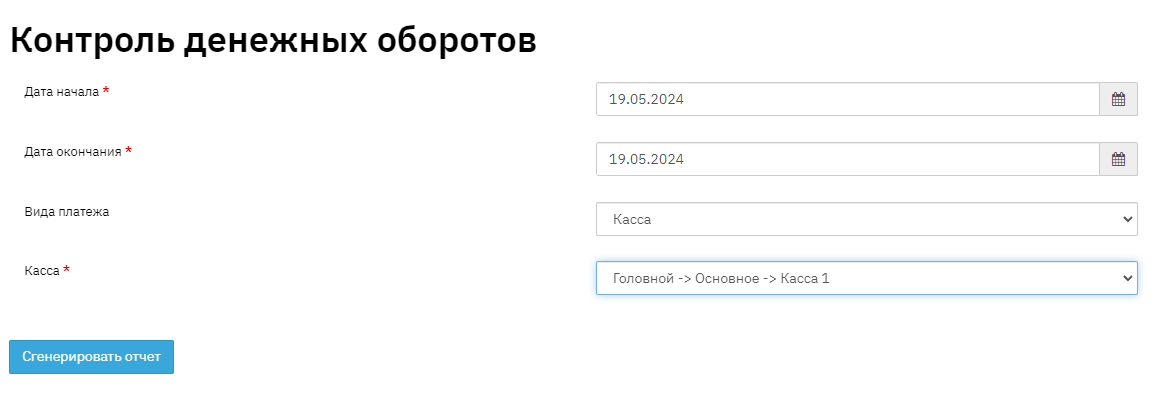
1. You need to select a period. When clicking the "Generate Report" button, a report will be displayed with detailed information on the head office cash register and all branches, including client's full name, contract code, income and expenses, operation name, amount type and movement, amount at the beginning of the day and totals at the end of the working day for the selected period. Special attention should be paid to the "Control Sum" column.
2. If cash movement was processed through the cash register but was not accepted or partially accepted, this amount will be placed under control and displayed in the "Control Sum". This means the amount will not be credited to the current contract balance and may result in overdue status.
3.When selecting the "Cash Register" filter, a more limited selection will be made for a specific branch cash register.

- Field "No." this field indicates the record sequence number.
- Field "Client" this field displays personal information from the client card – full name
- Field "Contract" this field indicates the contract number.
- Field "Region"
- Field "Branch" this field displays the name of the branch where the loan was opened. An organization may have several branches, accordingly, the report will include the branch where the loan was opened.
- Field "Division" this field displays the name of the division where the loan was issued. An organization may have several divisions, accordingly, the report will include the division where the loan was opened. In the program, any point of issue is considered a division. This information is displayed in the "Contract" - "Request" section.
- Field "Cash Register" this field indicates the name of the cash register through which the Cash Receipt/Disbursement movement was made.
- Field "Cash Flow No." this field indicates the sequential cash flow number for the contract.
- Field "Income" this field indicates the income amount for the contract.
- Field "Expense" this field indicates the expense amount for the contract.
- Field "Control Sum" this field indicates the unaccepted amount; if the value in this field is greater than "0", you need to find out the reason why the payment was not accepted.
- Field "Operation Name" this field indicates the name of the operation that occurred after auto-acceptance of the payment
- Field "Amount Type" this field indicates the amount type.
- Field "Movement Type" this field indicates the date of movement on the contract.
- Field "Amount" this field indicates the amount