Credit Product Module Description
Introduction
The "Credit Product" module in BS is a tool for configuring various financing conditions for clients (individuals/legal entities/sole proprietors/SME), such as BNPL, Lending for any purpose (PDL, POS, collateral lending), Leasing, Rental, and others. It is possible to configure any payment frequency, use multiple rates for interest calculation within one schedule, apply various types of penalties and charge additional fees, and much more. Below is a description of Credit Product parameters, grouped by their purpose.
Loan terms are determined by parameters such as:
1. Payment Schedule
- 1.1 Term and payment frequency (monthly, weekly, other frequency (any number of days), at the end of the month, one-time, etc.)
- 1.2 Calculating the monthly payment amount (what the payment consists of)
- 1.2.1 Interest amount calculation
- 1.2.2 Principal distribution
- 1.2.3 Additional fee calculation
2. Penalty Conditions for Overdue Payments
- 2.1 Interest rate change
- 2.2 Daily penalty accrual
- 2.3 Fixed fines for allowing overdue
3. Payment Receipt and Distribution Conditions
- 3.1 Repayment order constructor
- 3.2 Prepayment accounting (amounts overpaid by the client)
- 3.3 Prepayment distribution methods constructor
4. Conditions for Early Repayments and More
- 4.1 Need to submit an application for partial/full early repayment
- 4.2 Partial/full early repayment conditions (amount and date calculation)
- 4.3 Grace conditions
5. Other Conditions:
- 5.1 Prolongation
- 5.2 Restructuring
- 5.3 Automatic schedule recalculation
- 5.4 Switching to another credit product upon certain events
Parameters for Calculating the Contract Payment Schedule
To calculate the Schedule, you need to determine the loan term, payment frequency, and calculation of all types of amounts forming the debt (Principal, Interest, fees).
Loan Term and Payment Frequency in the Schedule
Below are the parameters that affect the calculation of payment dates in the Schedule. Parameter combinations solve not only standard calculation tasks but also provide individual offers to clients.
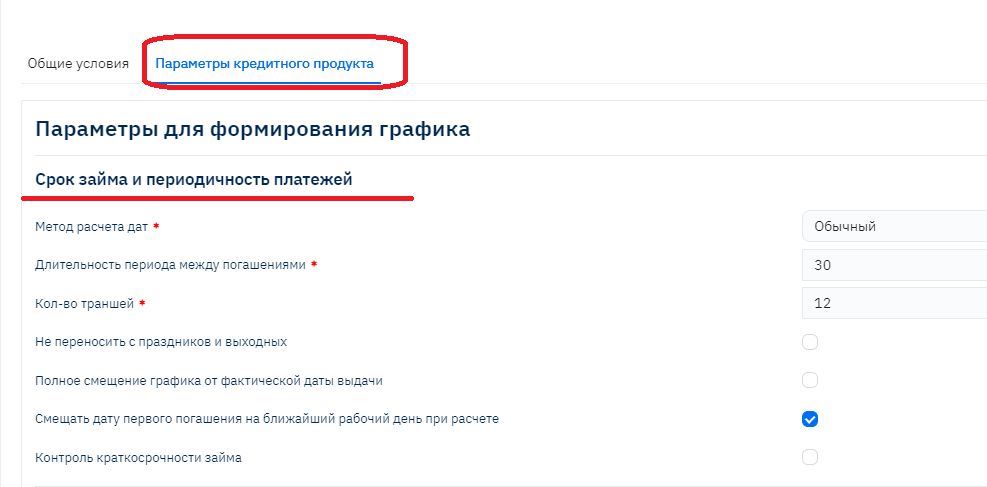
Let's consider various types of schedules and determine through examples which settings affect their calculation and how.
Schedule with Monthly Repayments ("Banking" Method)

In Brainysoft software terminology, payment periods within the schedule are "tranches" – the number of scheduled payments during the entire contract term. In this example, there are 6:
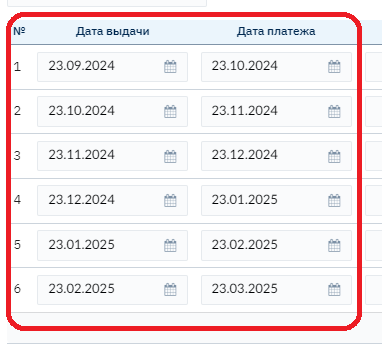
Settings:
- Date calculation method – banking
- Period duration between repayments – conditional value of "30" days, the system calculates based on "calendar month".
- Number of tranches – 6
Thus,
- Banking date calculation method – used to set up monthly repayments, dates are calculated by adding a calendar month to the disbursement date, allowing you to create a schedule with payments on a specific day of the month, for example on the 23rd as shown in the screenshot above
- Period duration between repayments – used to configure the duration of payment periods (tranches) in the schedule. But important! For the Banking date calculation method – this is always a calendar month, regardless of how many days are specified in this parameter, so the value "30" in this example is symbolic.
- Number of tranches – the number of scheduled client payments within the schedule.
Weekly Repayments ("Regular" Method), loan term 5 weeks:
Settings:
- Date calculation method – Regular
- Period duration between repayments – 7 (days)
- Number of tranches – 5

Thus,
- Regular date calculation method – used to configure schedules with any frequency, as dates are calculated simply by adding the period duration between repayments to the previous repayment date.
Payments every 14 days (as an example of any frequency), loan term 56 days (4 times 14 days):
Settings:
- Date calculation method – Regular
- Period duration between repayments – 14 (days)
- Number of tranches – 4

Repayments at the End of the Month ("By Last Days of Month" Method)
Settings:
- Date calculation method – "By last days of month"
- Period duration between repayments – conditionally 30 days
- Number of tranches – 5

Thus,
- "By last days of month" date calculation method - used to calculate monthly payments, with payment dates set to the last day of the month. Important! The value in the "Period duration between repayments" field is ignored during calculation.
Short PDL Loan
Settings:
- Date calculation method – Regular
- Period duration between repayments – 25 (days)
- Number of tranches – 1
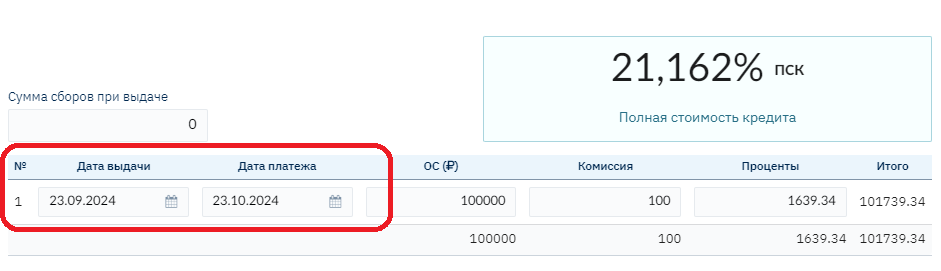
Thus, to calculate a PDL Schedule where it's important to configure a one-time repayment after a certain number of days, you need to use the combination:
- Number of tranches – 1
- Date calculation method – Regular
- Period duration between repayments – required value
Thus, To calculate a PDL Schedule where it's important to configure a one-time repayment after a certain number of days, you need to use the combination:
Number of tranches – 1
Date calculation method – Regular
Period duration between repayments – required value
If a company operates offline and accepts payments only on business days (cash at the cash desk or payments to the current account only on business days), there is a need to form a payment schedule only on business days. For this purpose, there is a "Do not transfer from holidays and weekends" flag; when the flag is set, the schedule is formed according to the selected date calculation method; if the flag is removed, a transfer to the next business day will occur. Important! To store information about holidays, you need to fill in the "Holidays" reference.
Schedule with Payment Date Transfer from Weekends to Business Days, with Monthly Repayments for 6 Months:
- Date calculation method – banking
- Period duration between repayments – conditional value of "30" days, the system calculates based on "calendar month".
- Number of tranches – 6
- Do not transfer from holidays and weekends – "No", i.e., the flag is not set

November 23 and 24, 2024, are Saturday and Sunday, the date was transferred to 11/25/24
02/23/2025 - Sunday, transferred to 02/24/25
03/23/25 – Sunday, transferred to 03/24/25
Important! The final loan term may be extended due to the transfer of the term in the last tranche
Schedule with Strictly Limited Term ("Without Shift Consideration" Method) with Payment Date Transfer to Business Day.
In a situation where:
- the loan term is strictly limited, for example, exactly 120 days,
- payments with a certain frequency, for example, every 30 days,
- it is necessary to transfer dates to a business day
when setting the above parameters, dates will be transferred and the loan term may exceed the limits, therefore another date calculation method "Without shift consideration" was developed
- Date calculation method – Without shift consideration
- Period duration between repayments – 30
- Number of tranches – 4
- Do not transfer from holidays and weekends – "No", i.e., the flag is not set (i.e., transfer occurs)

11/22/2024 + 30 days = 12/22/24, but since this is Sunday, it is transferred to the next business day 12/23/24
The next payment, to ensure the total loan term – 12 days, is calculated from the scheduled date before transfer: 12/22/24 + 30 days = 01/21/25
As a result, we get a total loan term from 09/23/24 to 01/21/2025 – 120 days
Full Schedule Shift from Actual Disbursement Date
In a situation where the Payment Schedule for the client has already been formed, but the actual disbursement was made later (on a different date), it is necessary to recalculate the payment schedule automatically. Two options are provided:
- Shift the actual disbursement date in the first tranche, thereby reducing the duration of the first tranche and the interest amount accordingly, the monthly payment amount will also be recalculated (Full schedule shift from actual disbursement date – "no")
- Shift the entire schedule along with all dates in the schedule (Full schedule shift from actual disbursement date – "yes"). Amounts in the schedule may also change, as the number of days in tranches may change taking into account transfers to business days or the overall term in general
Important! We recommend re-signing the current payment schedule when changing the disbursement date on the contract if the process requires it.
Thus, "Without shift consideration" date calculation method – is a method where dates are calculated by adding the period duration between repayments to the scheduled repayment date (before transfer to business day)
- Short-term loan control
For organizations providing exclusively short-term loans (term up to 1 year), additional control of the last payment date is provided. If, taking into account date transfers, the total loan term is more than 1 calendar year, the last repayment date is adjusted downward.
- Client chooses the payment date themselves
For situations where the client chooses a convenient payment date themselves, the program provides the ability to change the first payment date directly in the contract (individually). All other schedule dates will be calculated based on the established first payment date:
For example, it is convenient for the client to pay on the 15th of the month:
In the contract, the First Repayment Date field is set to 10/15/24, then all payment dates are calculated on the 15th (provided there is no setting to transfer to business days)

- Date calculation method – banking
- Period duration between repayments – conditional value of "30" days, the system calculates based on "calendar month".
- Number of tranches – 6
- Do not transfer from holidays and weekends – Yes
- Change of first repayment date in the contract
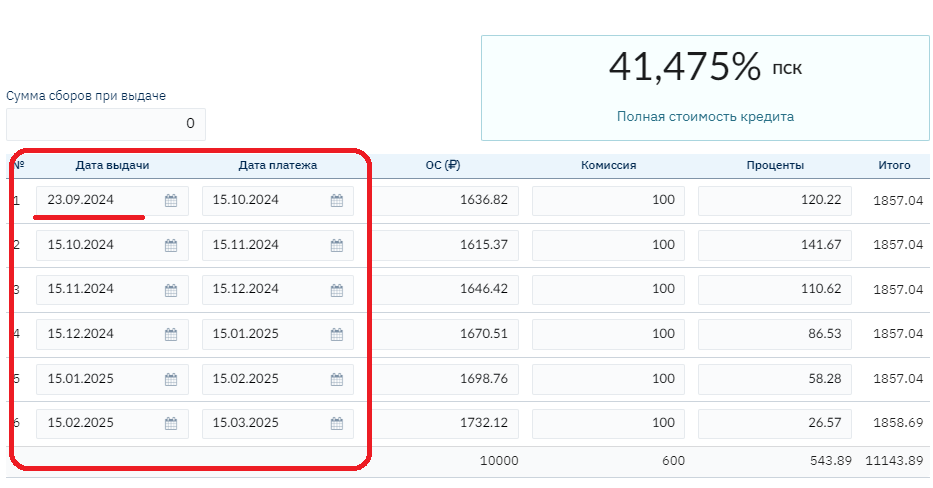
Shift First Repayment Date to Nearest Business Day When Calculating
Since the calculation of payment dates in the Schedule "depends" not only on the date calculation method but also on the first repayment date in the schedule, there is a need to adjust the first repayment date automatically, shifting it to the nearest business day. When the flag is set, the first payment date in the schedule is shifted to the nearest business day.
General Description of "Term and Payment Frequency" Parameters
Summarizing the cases described above, let's formulate a description of each parameter in the "Term and Payment Frequency" settings block
Banking date calculation method – used to configure monthly repayments, dates are calculated by adding a calendar month to the disbursement date, allowing you to create a schedule with payments on a specific day of the month, for example on the 23rd as shown in the screenshot above
Regular date calculation method – used to configure schedules with any frequency, as dates are calculated simply by adding the period duration between repayments to the previous repayment date. Then a check for a holiday or weekend (Saturday, Sunday) is performed and a shift occurs if the repayment date falls on a weekend (if the necessary flag is present). The next repayment date is calculated by adding the period duration to the resulting current repayment date.
"By last days of month" date calculation method - used to calculate monthly payments, with payment dates set to the last day of the month.
"Without shift consideration" date calculation method – dates are calculated by adding the period duration between repayments to the scheduled repayment date (before transfer to business day). In other words, the next repayment date is calculated by adding the repayment duration multiplied by the repayment sequence number to the loan disbursement date.
Used for cases where it is necessary to ensure a certain loan term, even if dates need to be transferred to a business day, as date transfers do not affect the final loan term Period duration between repayments – the duration of payment periods (tranches) in days is specified in the schedule.
Important! For the "Banking" date calculation method and "By last days of month" – the period duration for date calculation is always calendar month by default, regardless of how many days the user specifies during configuration, so the value "30" is set "symbolically" since the field is required.
Number of tranches – the number of scheduled payments (tranches) within the schedule.
Do not transfer from holidays and weekends – an additional date calculation parameter, used to transfer the tranche date to the next business day.
Full schedule shift from actual disbursement date – a parameter for automatic schedule change configuration, in situations where disbursement occurred on a date different from the scheduled disbursement date specified in the schedule (the start date of the first tranche).
If the flag is set – the Schedule is completely shifted (with all dates) by the number of days the disbursement date changed.
If the flag is not set - only the start date of the first tranche is adjusted (the number of days in the first tranche is reduced).
Shift first repayment date to nearest business day when calculating – if this flag is present, the first repayment date will be shifted to a business day, all subsequent schedule dates will be calculated based on the established first repayment date (taking into account the shift). If the flag is not set, but the setting to transfer dates to business days is applied, then all subsequent dates will be calculated based on the scheduled first repayment date without taking into account the transfer (i.e., a weekend or holiday).
Short-term loan control – the presence of this flag allows automatic adjustment of the last repayment date in the schedule if it is important that the total schedule term does not exceed one year.
Calculating Interest and Principal Amounts in the Schedule
After calculating dates in the Schedule, you need to decide on the payment amount calculation option, which consists of the Interest amount and Principal ("Principal Amount" in Brainysoft software terminology). Due to the fact that Brainysoft faced the task of developing a tool for configuring conditions for very different financial products (Loans for any purpose, POS, BNPL, Rental, Leasing, Credit lines (similar to credit cards and others), a wide range of parameters and calculation methods is presented.
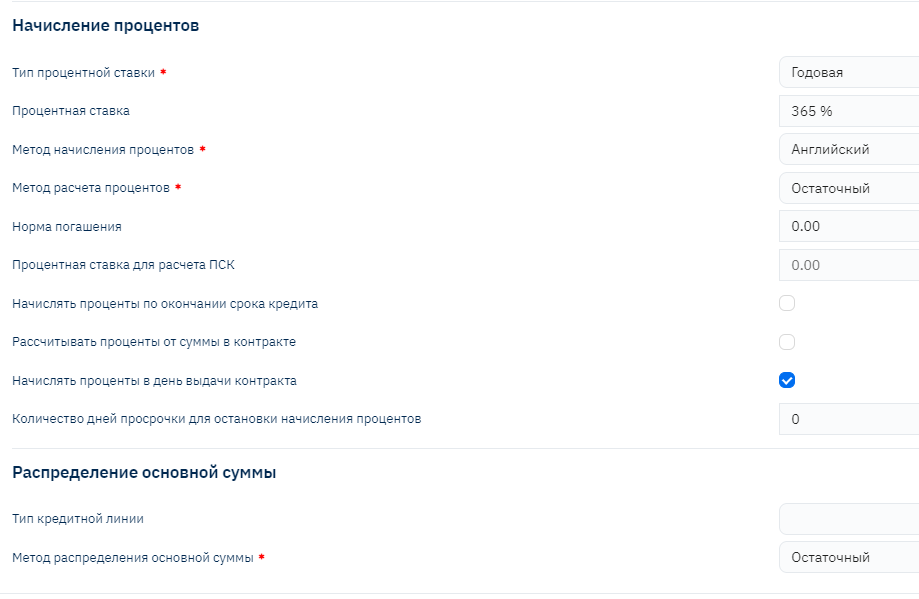
The main calculation parameter affecting the payment amount calculation algorithm (Principal and Interest) is the Interest Calculation Method.
Also, significant influence on the formula for calculating the Payment Norm (tranche payment) and the interest itself have the parameters: "Interest Rate Type" and "Interest Accrual Method". All calculation formulas will be presented below in the descriptions of these parameters.
Let's consider the interest calculation method algorithms implemented in Brainysoft software
The basic options are:
- Residual calculation method (annuity)
- Simple calculation method
- Combined calculation method
Interest and Principal Calculation Methods: Residual (Annuity)
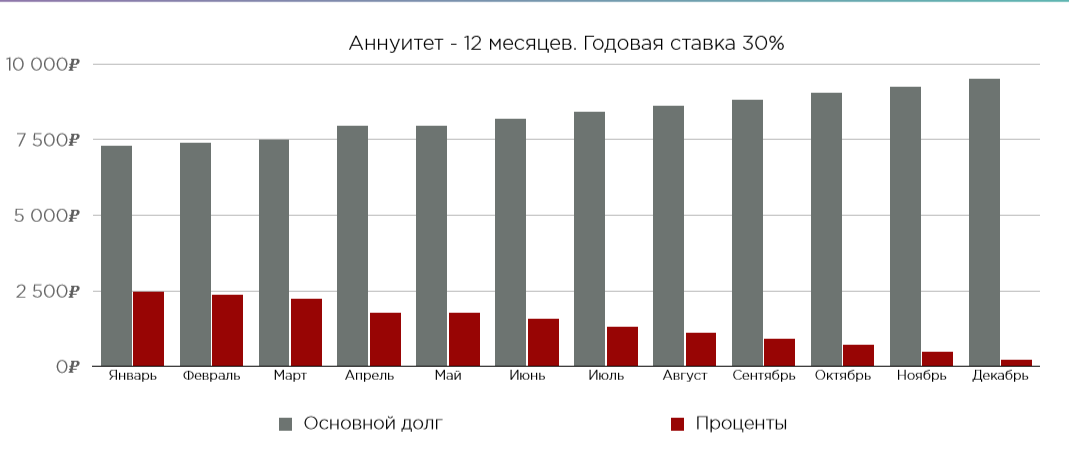
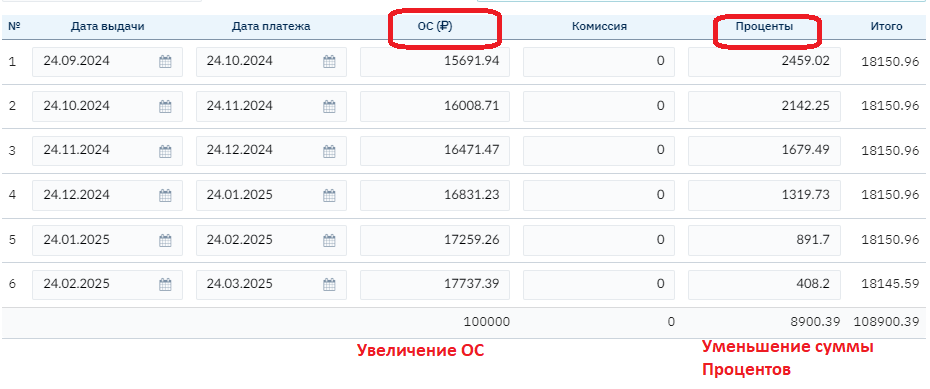
Residual method (Annuity) — a repayment schedule that involves paying the principal and loan interest, while the payment amount in each payment period is the same.
The borrower makes the same payment once a month until they have fully settled with the financial company (the last payment closes the remaining debt, so it may slightly differ from the annuity payment).
At the same time, within the annuity payment itself, the debt amount and accrued interest are distributed unevenly. With an annuity repayment schedule, each monthly payment includes the interest amount for the period and part of the principal. As payments are made, the principal decreases, which means the amount of accrued interest is reduced. Therefore, at the beginning of the contract term, the larger part of the monthly payment consists of interest, and towards the end of the term – the principal.
For the Client (Borrower), it is convenient because it is always an even and understandable financial burden, they can plan their budget, and the same payment amount that is easy to remember (Payment Norm/Monthly payment with monthly frequency).
Important! The interest accrual base is the principal amount in the client's hands. Interest income is accrued on the active debt balance in the client's hands, and the repayable principal is determined by the difference between the repayment norm and the accrued interest income, i.e., automatically.
Schedule Example:
Interest and Principal Calculation Methods: Residual with Grace Tranches
Another option for the annuity algorithm calculation method: Residual with grace tranches, where the interest accrual base is also the principal amount in the client's hands.
Unlike the previous calculation method, this method allows specifying grace tranches that can be flexibly placed in user mode within a separate contract.
The Payment Norm for non-grace tranches will be calculated according to the annuity payment algorithm and will be the same for all non-grace payments. In grace tranches, the client pays only interest.
Example:

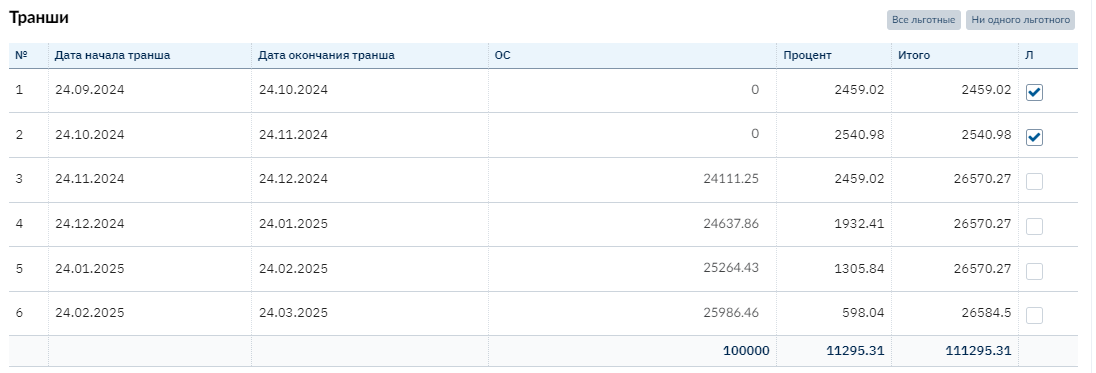
Interest and Principal Calculation Methods: Residual with Two Rates
The accrual base is also the principal balance in the client's hands, since this is a Residual method, but additionally there is an option to specify different rates for interest calculation for two different periods. Important! The Payment Norm with this calculation method will differ for different periods.
Example #1.

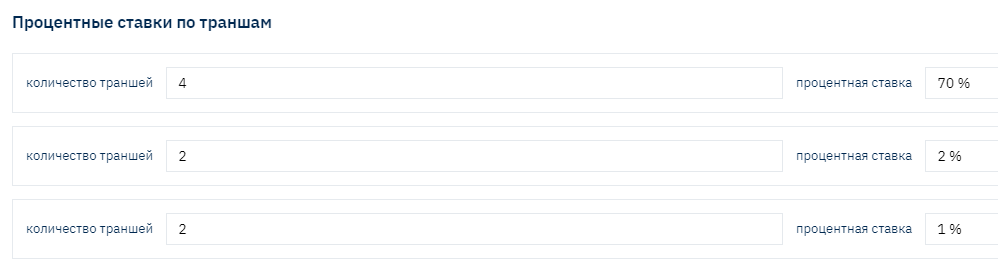

Payment Norm (monthly payment amount) – was 15,025.05 for all tranches, regardless of the specified rate
At the same time, the distribution of Principal and Interest amounts differs significantly: in the first period, the interest amount is significantly higher, and the Principal is lower.
At the same time, the overall product rate may not exceed current legislation restrictions (in Russia, APR).
Interest and Principal Calculation Methods: Residual Composite
A method where the interest accrual base is also the principal balance in the client's hands, while there is an option to specify the "Overall product interest rate," the rate for the first period, the rate for the second period, and the rate for the remaining period will be calculated based on the specified overall rate:
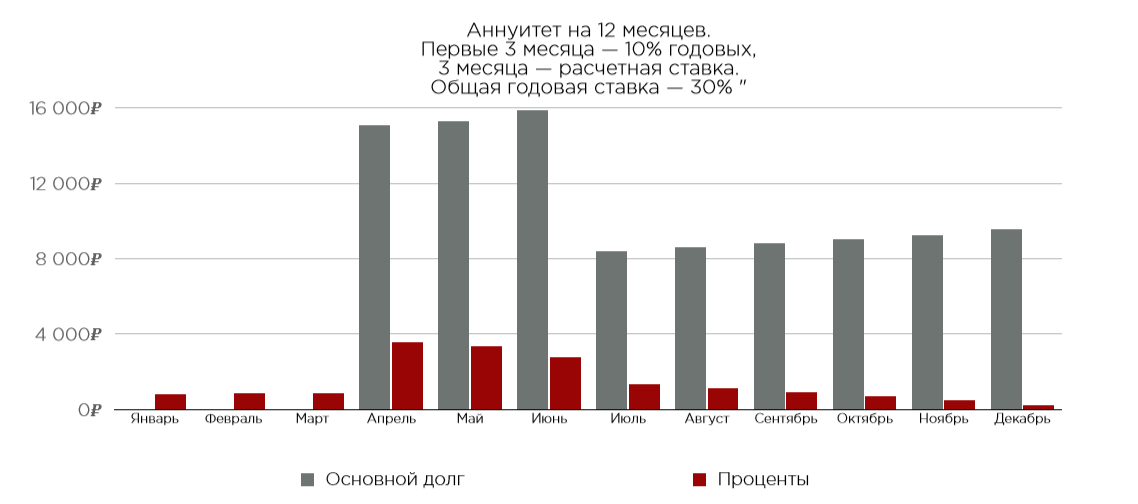
The Payment Norm with such calculation differs for each period.
Interest and Principal Calculation Methods: Simple
Simple interest accrual method – can be used for a financial product where a constant interest amount is required, accrued from the disbursed amount, i.e., the base for interest accrual is the total disbursed loan amount. At the same time, Principal is distributed flexibly with various variability. Can be used for calculating rental or lease payments with buyout. Even in the case of early Principal repayment, interest with this calculation method will continue to accrue from the disbursed loan amount.
Example #1:
Example #2
With the simple interest calculation method, the client is not interested in repaying Principal ahead of time, as interest still does not decrease but continues to accrue "according to the original schedule," so most often all Principal is planned for payment at the end of the loan term.
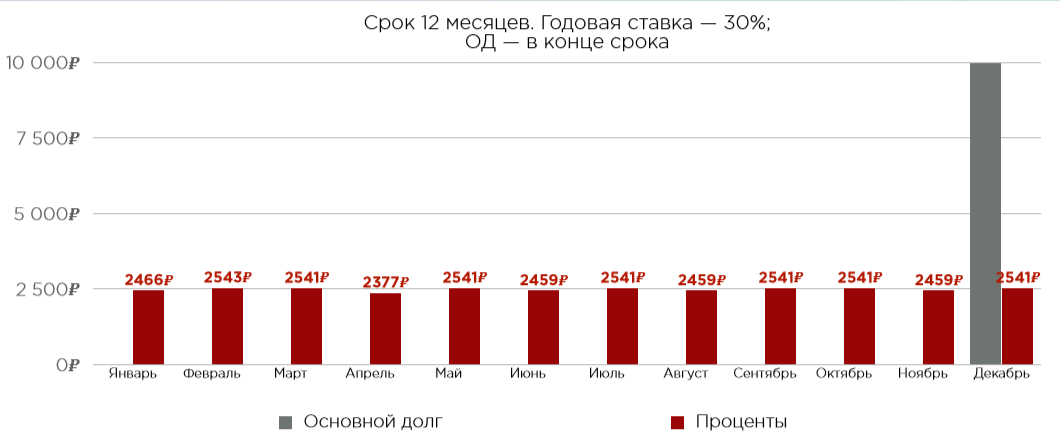
Example #3.
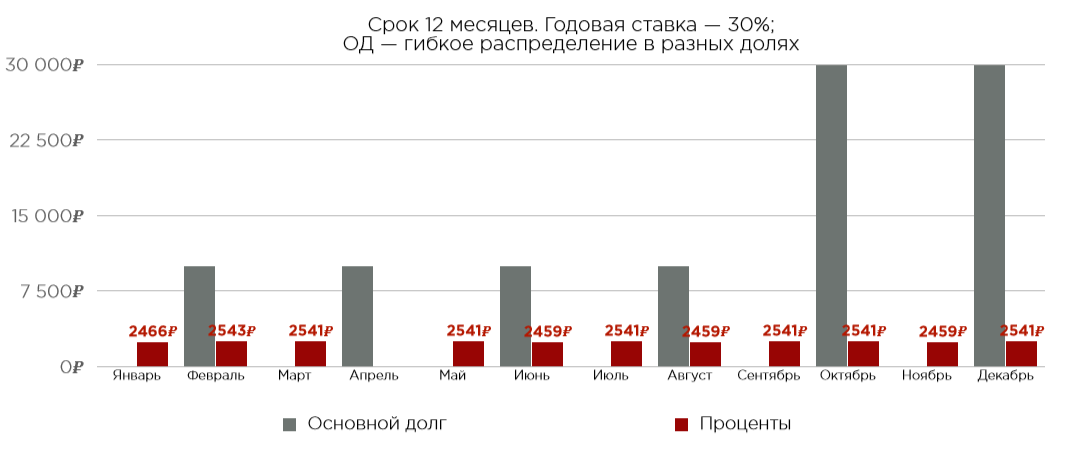
Such a Schedule may be interesting for seasonal business income of the client, when it is more convenient to pay large amounts in certain months. The ability to distribute Principal flexibly individually within each separate contract is provided.
Interest and Principal Calculation Methods: Simple with Two Rates
The accrual base is also the disbursed amount, with the added option to specify different rates for two different periods.
Example #1.
With an annual rate, the monthly payment amount may differ slightly. Since with monthly payments, payment periods may have different numbers of days. (Interest calculation for each separate rate type is described below).
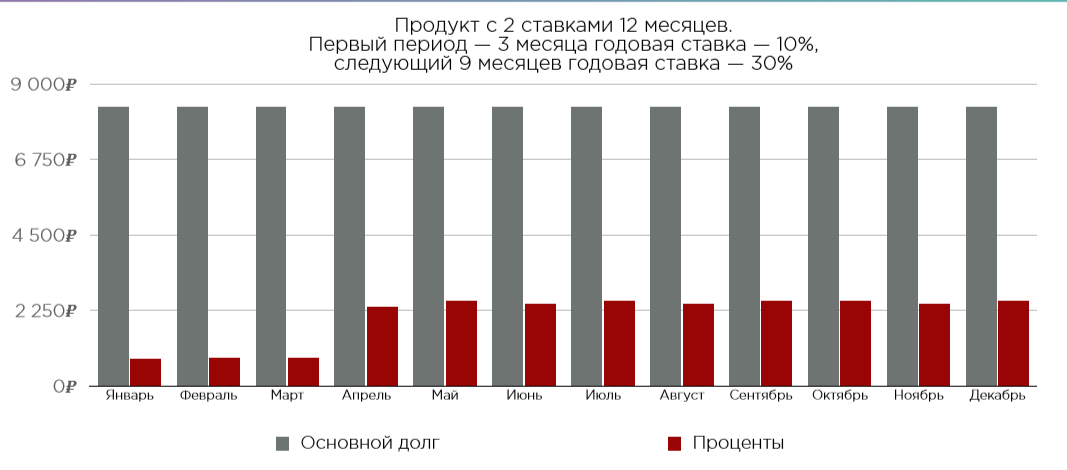
Example #2.
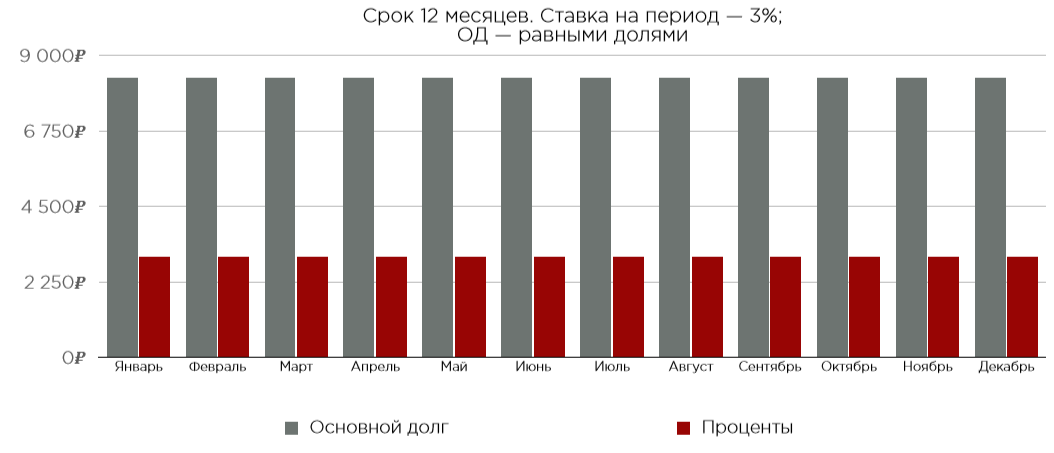
Interest calculation with a rate per period allows configuring the same monthly payment amount for a period with the same rate, provided the Principal distribution is "in equal shares" across all tranches.
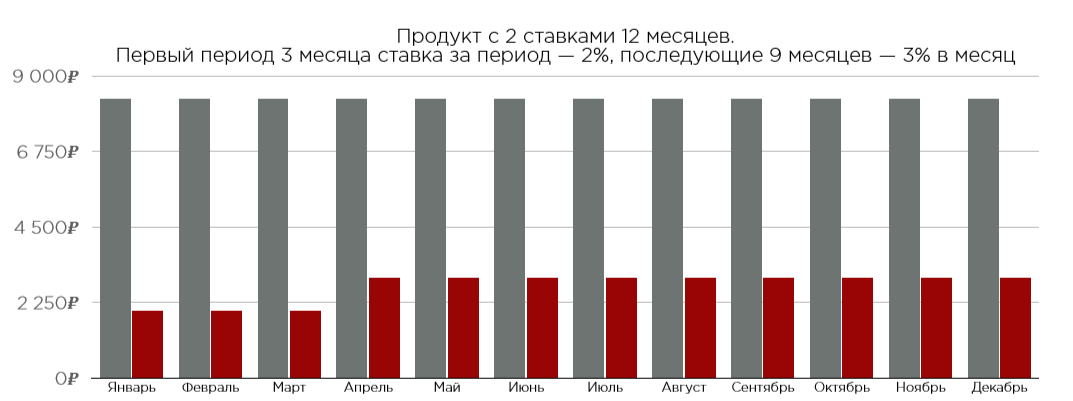
The payment amount for the first three tranches will be the same, as well as for the remaining 9 periods.
Interest and Principal Calculation Methods: Combined
A compromise or combination of the two calculation methods described above, Residual and Simple:
The base for interest calculation and accrual is the Principal balance in the client's hands as with the residual calculation method, while there is the ability to distribute Principal – distribute according to "your own" rules within the product or each separate contract as with the Simple calculation method.
Example #1.
Principal is distributed in equal shares each month, while the interest amount, as the accrual base (Principal) decreases, also decreases
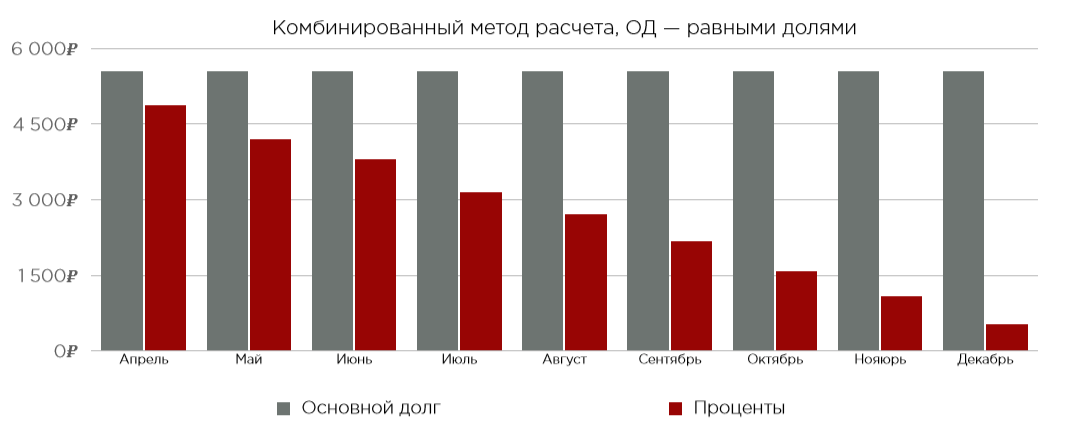
Such a Schedule is also called Differentiated, its main difference from annuity is that the monthly amount is different each time. It also consists of principal and interest on it, but, unlike annuity, here the principal repayment amount is always the same. And since interest is accrued on the remaining principal debt, their amount decreases with each payment. It turns out that the burden on the borrower is higher at the beginning of the contract term than towards the end: as the interest amount decreases with the reduction of the remaining principal.
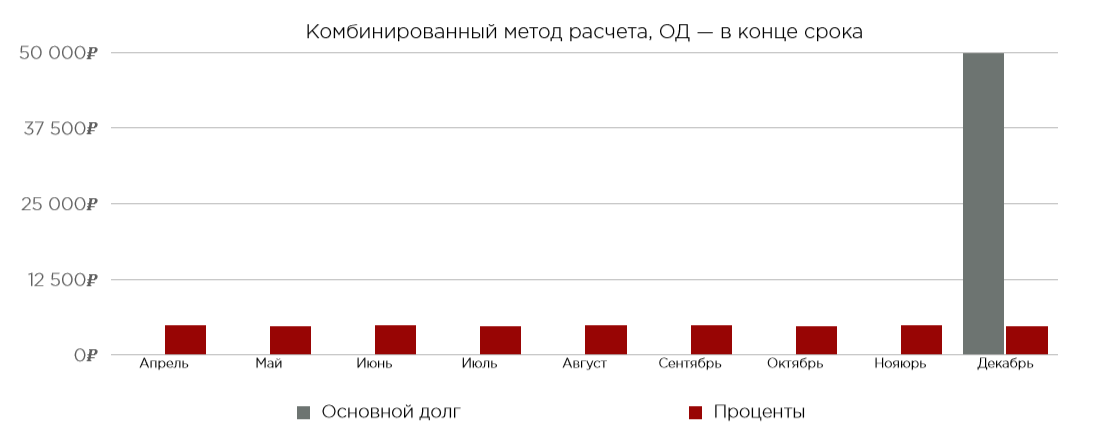
Example #2.
The Schedule visually looks similar to the example with the Simple interest calculation method, with Principal payment at the end of the term, but! Important! With a combined calculation schedule, when making an early payment and repaying Principal partially ahead of time, the interest amount will be accrued less than in the scheduled schedule, as the accrual base has decreased.
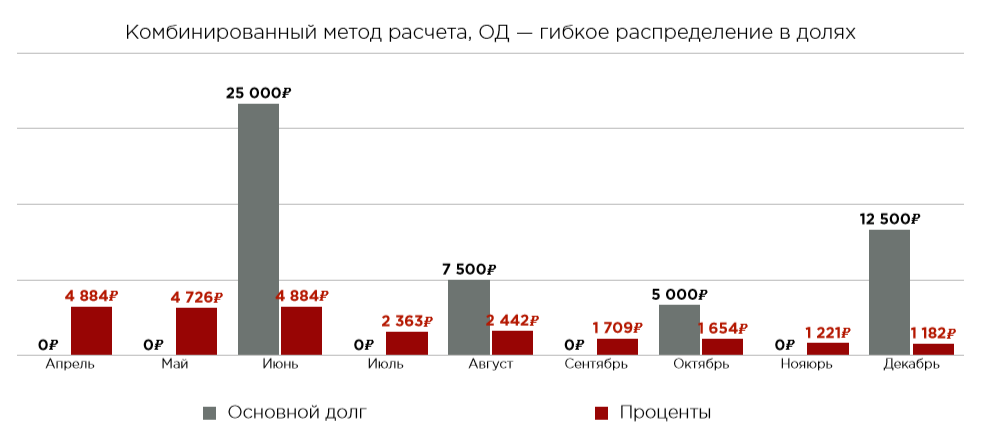
Example #3.
This example also shows that when distributing Principal in different shares with a constant rate, the interest amount decreases.
Example #4.
Principal is distributed in equal shares, while the interest amount decreases with each subsequent payment.
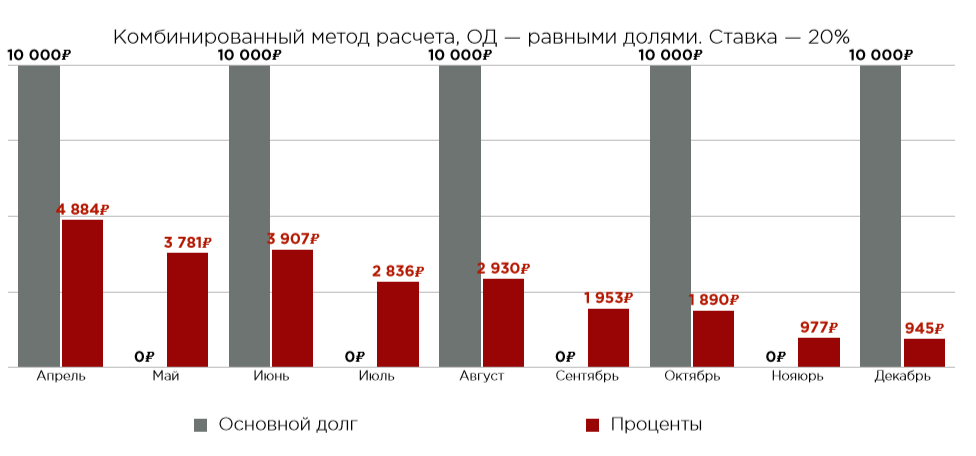
It should be noted that with the combined calculation method, the total cost of credit is lower, so such conditions are most often provided individually for legal entities for large amounts with lower risks. Requirements for the client should be stricter.
Interest and Principal Calculation Methods: Balloon Flexible Schedule
Balloon is a schedule consisting of two annuities. The disbursement amount is divided into two necessary parts and two periods. For each separate period, "its own Payment Norm" is calculated and the distribution of Principal and Interest - according to annuity.
Visually, the Schedule looks like two separate Schedules combined within one contract.
For this method, a new field "Principal Amount of Second Period" has been added to CreditField, which is used to calculate this balloon. The number of tranches in the first period field - qtyTranchesFirstPeriod - is also used to calculate the balloon schedule.
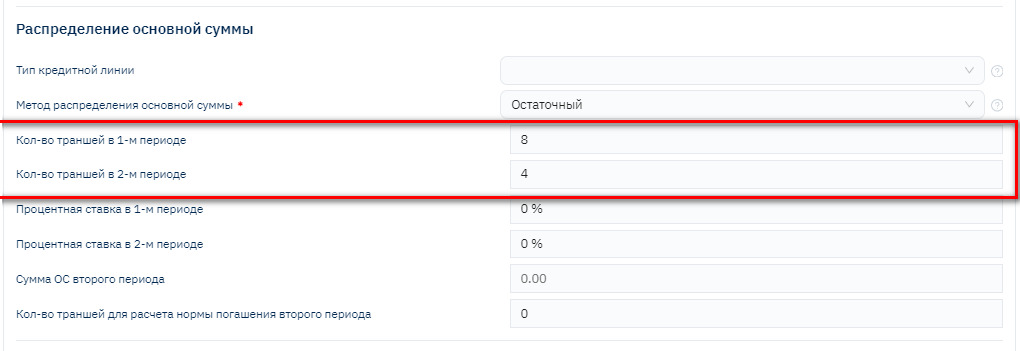
I.e., for the first period, the number of tranches is set, for the second period, the amount is set, and based on this, the final schedule is calculated (the interest rate is the same for both periods).

Interest and Principal Calculation Methods: Operating Lease
A separate credit product called operating lease
This is a new type of activity related to the collateral register. Designated as a separate type of contract. Operating Lease date calculation method - by last days of the month.
Interest calculation method (operating lease remuneration)
The principal debt for rent is calculated using the following formula:
Monthly Principal (Principal) = "Total Principal for Rent" / "Rent Term".
Rent remuneration is calculated using the following formula:
Monthly Interest (Remuneration) = ("Total vehicle cost + additional options + insurance + taxes" + "Vehicle residual value") * Money rate factor
Monthly rent payment is calculated using the following formula:
Monthly Rent Payment = (Monthly Principal (Principal) + Monthly Interest (Remuneration)) + VAT
The schedule is built for 1 month more than the rental term.
For example, the rental term is 24 months. The schedule is built for 25 tranches (24+1).
The first and last tranche combined should total 30-31 days (depending on the number of days in the first month of rent), the sum of the first and last tranche should equal the amount of standard tranches for rent.
The number of days in the last tranche should equal the difference of 30-31 days (depending on the number of days in the first month of rent) and the number of days in the first tranche.

The next important parameter affecting interest calculation, and therefore the final Schedule, is "Interest Rate Type"
Interest Rate Types: Daily, Annual, and Per Period
Daily
With a daily interest rate, the interest amount calculation will occur based on the actual number of days in a particular period (or for 1 day) at the specified rate.
Most often used for PDL types, as it is mandatory to comply with APR restrictions.
For example, according to current legislation in Russia today, the maximum allowable rate is 0.8 percent per day, meaning APR is no more than 292
Annual Rate
With an annual rate, to calculate interest for 1 day or period, it is necessary to first calculate the daily rate based on whether the period belongs to a leap year or not, and an additional parameter "Interest accrual method: English, German, or French" is also taken into account, where:
- German calculation method (360/30)
31st interest is never accrued, on February 28, interest is accrued for 3 days at once.
- English calculation method (365/actual number of days in the month)
- French calculation method (360/actual number of days in the month)
Rate Per Period
Most often used for products where it is important to maintain the same yield for all periods in the schedule, regardless of how many days are in the period (for a tranche with 28 days and a tranche with 31 days – the total interest amount will be calculated at a single rate).
Below are the formulas for calculating the Repayment Norm in the Schedule, taking into account the interest calculation method, interest rate type, and interest accrual method.
Calculation Formulas: Simple Interest Accrual Method – Rate Per Period
The base for interest accrual is the total disbursed loan amount. The daily interest accrual amount is calculated using the formula
D = S*P/n
and for the period:
F = S*P
where:
D – accrual amount for 1 day
F – interest for the entire period
S – total contract disbursement amount
P – interest rate per period
n – actual number of days in the period
In this case, if periods differ in duration, the daily interest accrual amount will also be different.
Calculation Formulas: Simple Interest Accrual Method – Annual Rate
The base for interest accrual is the total disbursed loan amount. The daily interest accrual amount is calculated using the formula
D = S*G/Q
and for the period
F = S*G/Q * n
where:
D – accrual amount for 1 day
F – interest for the entire period
S – total contract disbursement amount
G – annual interest rate
- German calculation method (360/30)
Q = 360, n = 30
31st interest is never accrued, on February 28, interest is accrued for 3 days at once.
- English calculation method (365/actual number of days in the month)
Q = 365
n = actual number of days in the period
- French calculation method (360/actual number of days in the month)
Q = 360
n = actual number of days in the period
Calculation Formulas: Residual Interest Accrual Method – Rate Per Period
The interest accrual base is the principal amount in the client's hands. Moreover, with this method, the client always brings the same amount, which is called the "Repayment Norm," interest income is accrued on the active debt balance in the client's hands, and the repayable Principal is determined by the difference between the repayment norm and the accrued interest income.
Before calculating the schedule, the repayment norm is first calculated
N = (SP(1+P)**k)/( (1+P)**k-1)
where:
N – repayment norm
S – total loan amount
P – interest rate per period
k - number of repayments
Then daily interest is calculated as follows:
D = (S-Pr)*P/n
And interest for the entire period
F = (S-Pr)*P
where:
D – accrual amount for 1 day
F – interest for the entire period
S – total contract disbursement amount
Pr – total principal repaid before the current repayment
P – interest rate per period
n – actual number of days in the period
Principal repaid in the current period:
T = N – F
where:
F – interest for the entire period
N – repayment norm
Calculation Formulas: Residual Interest Accrual Method – Annual Rate
The interest accrual base is the principal amount in the client's hands. Moreover, with this method, the client always brings the same amount, which is called the "Repayment Norm," interest income is accrued on the active debt balance in the client's hands, and the repayable Principal is determined by the difference between the repayment norm and the accrued interest income.
Before calculating the schedule, the repayment norm is first calculated
N = (SG/12(1+G/12)**k)/( (1+G/12)**k-1)
Where
N – repayment norm
S – total loan amount
G – annual interest rate
k - number of repayments
Then daily interest is calculated as follows:
D = (S-Pr)*G/Q
And interest for the entire period
F = (S-Pr)G/Qn
where:
D – accrual amount for 1 day
F – interest for the entire period
S – total contract disbursement amount
Pr – total principal repaid before the current repayment
G – annual interest rate
- German calculation method (360/30)
Q = 360, n = 30 31st interest is never accrued, on February 28, interest is accrued for 3 days at once.
- English calculation method (365/actual number of days in the month)
Q = 365
n = actual number of days in the period
- French calculation method (360/actual number of days in the month)
Q = 360
n = actual number of days in the period
Principal repaid in the current period:
T = N – F
where:
F – interest for the entire period
N – repayment norm
Method Correction
In case of calculating the residual method from the annual interest rate and when choosing English or French methods, an error occurs in the schedule. The principal amount of the last schedule tranche is calculated as follows
T = S-Pr
where:
S – total contract disbursement amount
Pr – total principal repaid before the current repayment
Thus, the repayable principal amount and N repayment norm turn out to be different. A special repayment norm selection algorithm is applied here to reduce the difference between the total amount of the last repayment and all others. This algorithm is implemented computationally
Calculation Formulas: Residual Grace Interest Accrual Method – Rate Per Period
Before calculating the schedule, the repayment norm is first calculated
N = (SP(1+P)(k-L))/( (1+P)(k-L)-1)
where
N – repayment norm
S – total loan amount
P – interest rate per period
k - total number of repayments
L – number of grace repayments
Then daily interest is calculated as follows:
D = (S-Pr)*P/n
And interest for the entire period
F = (S-Pr)*P
where:
D – accrual amount for 1 day
F – interest for the entire period
S – total contract disbursement amount
Pr – total principal repaid before the current repayment
P – interest rate per period
n – actual number of days in the period
Principal repaid in the current period if the repayment is not "grace":
T = N – F
where:
F – interest for the entire period
N – repayment norm
Or T=0 in case of "grace" repayment
Calculation Formulas: Residual Grace Interest Accrual Method – Annual Rate
Before calculating the schedule, the repayment norm is first calculated
N = (S ** G/12 ** (1+G/12) ** (k-L))/( (1+G/12) ** (k-L)-1)
where
N – repayment norm
S – total loan amount
G – annual interest rate
k - number of repayments
L – number of grace repayments
Then daily interest is calculated as follows:
D = (S-Pr)*G/Q
And interest for the entire period
F = (S-Pr)_ G/Q _ n
where:
D – accrual amount for 1 day
F – interest for the entire period
S – total contract disbursement amount
Pr – total principal repaid before the current repayment
G – annual interest rate
- German calculation method (360/30)
Q = 360, n = 30
31st interest is never accrued, on February 28, interest is accrued for 3 days at once.
- English calculation method (365/actual number of days in the month)
Q = 365
n = actual number of days in the period
- French calculation method (360/actual number of days in the month)
Q = 360
n = actual number of days in the period
Principal repaid in the current period:
T = N – F
where:
F – interest for the entire period
N – repayment norm
Or T=0 in case of "grace" repayment
Method Correction
In case of calculating the residual method from the annual interest rate and when choosing English or French methods, an error occurs in the schedule. The principal amount of the last schedule tranche is calculated as follows
T = S-Pr
where:
S – total contract disbursement amount
Pr – total principal repaid before the current repayment
Thus, the repayable principal amount and N repayment norm turn out to be different. A special repayment norm selection algorithm is applied here to reduce the difference between the total amount of the last repayment and all others. This algorithm is implemented computationally
Calculation Formulas: Combined Interest Accrual Method – Rate Per Period
The interest accrual base is the active principal balance in the client's hands. The principal with this method is distributed in equal parts between repayments by default, or flexibly redefined in user mode at the user's discretion.
Daily interest is calculated as follows:
D = (S-Pr)*P/n
And interest for the entire period
F = (S-Pr)*P
where:
D – accrual amount for 1 day
F – interest for the entire period
S – total contract disbursement amount
Pr – total principal repaid before the current repayment
P – interest rate per period
n – actual number of days in the period
Calculation Formulas: Combined Interest Accrual Method – Annual Rate
The interest accrual base is the active principal balance in the client's hands. The principal with this method is distributed in equal parts between repayments by default, or flexibly redefined in user mode at the user's discretion.
Daily interest is calculated as follows:
D = (S-Pr)*G/Q
And interest for the entire period
F = (S-Pr) * _ G/Q _ * n
where:
D – accrual amount for 1 day
F – interest for the entire period
S – total contract disbursement amount
Pr – total principal repaid before the current repayment
G – annual interest rate
- German calculation method (360/30)
Q = 360
n = 30
31st interest is never accrued, on February 28, interest is accrued for 3 days at once.
- English calculation method (365/actual number of days in the month)
Q = 365
n = actual number of days in the period
- French calculation method (360/actual number of days in the month)
Q = 360
n = actual number of days in the period
Additional Fees: Fee Collection Configuration
Brainysoft software provides the ability to configure accounting for additional charges on the contract for various types of fees. This can be a collection of fees, i.e., simultaneously configure accounting for several types of fees within one product or contract
Fee (charge) – is a payment for services that a financial company provides to its clients. Expressed in absolute or relative terms. For example, a card or loan servicing fee may be 750 rubles per year, and a fee for withdrawing cash through an ATM – 5% of the amount withdrawn, etc.
Insurance contributions can act as additional payments if the company collects them from the client itself. Or fees can be configured only for calculation in the schedule and client notification, while no accruals will be made
The functionality configuration is relevant both for traditional loans, auto loans (insurance) and for POS, or BNPL to reflect fees to stores, partners, etc
Let's consider the configuration parameters:

Amount Type – a dropdown list of possible values from the debt types reference.
The selected amount type will appear in the balance, operations, Schedule, reports, etc.
If necessary, you can add a new amount type, but important! There may be an additional need to add amount types to reporting or specific data retrieval methods via api.
Accrual Moment – possible options for configuring the moment when the fee should be accrued:
At Disbursement – used when it is necessary for the client to pay the fee before disbursement or immediately at disbursement, once. The fee debt is accrued and immediately repaid at the time of disbursement reflection. First, a Payment for the fee amount is created, then disbursement on the contract is made. Acceptance of both cash flows is made only at the time of creating the expense cash flow (disbursement). For example, a loan processing fee
Prepayment at Disbursement – differs from the previous accrual method in that the client makes a one-time fee payment at disbursement, but accrual and crediting of the amount against fee debt repayment occurs during the entire loan term. I.e., the client makes the fee amount as a prepayment (advance payment) to repay the fee during the entire contract term.
At First Repayment – one-time debt accrual for the fee amount, with a due date until the first scheduled repayment
At Each Repayment - fee accrual similar to interest for each tranche in the Schedule, but for the total calculated amount, according to calculation settings, on the first day of the tranche (at the beginning of the payment period), with a payment deadline until the end of the tranche
At Each Repayment (on the last day of the tranche) – similar to the previous method, but accrual occurs for the fee amount only on the last day of the tranche
At Each Repayment (in parts) – differs from the previous two calculation methods in that accrual occurs daily in parts using the calculation formula: total fee amount per tranche / number of days in the tranche
Annually – used for accounting for fees with payment once a year (usually Insurance, etc.), calculated and accrued at the beginning of the year
Annually after Insurance Term Expiration – similar to the previous calculation method, except that calculation and accrual occurs at the end of the year
At First Disbursement on Credit Line – relevant only for contracts within a Credit Line, when it is necessary to accrue a fee only on the first contract within the line, while for all other contracts, no fee is charged at disbursement
Schedule Recalculation – Term Extension – the ability to charge an additional fee when providing the "Term Extension" service (lengthening the schedule with a reduction in the monthly payment amount, while the client does not make early repayment, but only uses the provided service)
Schedule Recalculation – Payment Skip - the ability to charge an additional fee when providing the "Payment Skip" service (lengthening the schedule by adding grace tranches in the specified quantity, relevant if the client cannot make the full payment amount, while not wanting to allow overdue. The schedule is shifted by the number of grace – skipped tranches) Fee amounts for Skip and Extension are calculated, may depend on several parameters: amount, term, share of unpaid Principal, etc. Configured in the "Schedule Recalculation Fee" reference, applied at the time of accrual, after the client submits an Application for the additional service.
Fee Type – possible options for calculating the fee amount:
Rate – a rate is specified for calculating the fee amount, while it is important to specify the Accrual Base (what to calculate from):
- Disbursed amount
- Active amount
- Tranche amount
- Market value of collateral
- Collateral value
Amount – fixed amount, while the amount must be specified in the Value field
Composite Rate- the ability to specify different rates for fee calculation in different periods. Values must be specified separated by commas, corresponding to the number of tranches specified in the product.
Value from the "Schedule Recalculation Fee" reference - used only for Extension and Payment Skip.
Fee amounts for Skip and Extension are calculated, may depend on several parameters: amount, term, share of unpaid Principal, etc. Configured in the "Schedule Recalculation Fee" reference, applied at the time of accrual, after the client submits an Application for the additional service.
Overdue Penalty - if it is necessary to accrue a penalty when the accrued fee amount is overdue. The rate is specified in the penalty collection
Do Not Accrue, Do Not Repay - applied when it is necessary to only calculate the amount to notify the client, there should be no fee accrual and repayment operations, as the client pays the amount to an external counterparty (for example, pays insurance to the Insurance Company, not to the MFO or bank)
Participates in APR Calculation – include calculated fee amounts in the Schedule in the base for calculating the APR indicator (relevant for Russia)
Include in Accrual Base in Tranche Amount -
Parameters Affecting Further Automatic Loan Servicing by the System Under Various Circumstances
After disbursement is made on the contract, it is considered active. Further debt amount accrual occurs in accordance with the conditions specified in the credit product (important! Values are transferred from the credit product to the Contract and saved in fields in the contract). If the client makes payments according to the Schedule, then accruals will equal the amounts specified in the Schedule. But under other circumstances, amounts will differ and depend on the following settings:
- Overdue conditions
- Early repayment conditions
- Payment distribution conditions (auto-acceptance) depending on various parameters (credit holidays, certain contract or client statuses, etc.)
- Grace conditions
- Prolongation and other types of contract term changes
Configuring these conditions allows you to fully automate the contract servicing process automatically, without the need to manually control states for corrections.
Overdue Accounting
Debt overdue in Brainysoft software is "recognized" or occurs at the moment when the scheduled debt payment date arrives – day 0 of overdue.
If the payment is not repaid during the day, the next day the contract is assigned the Overdue status, and there is an opportunity to apply "penalty sanctions" pre-configured in the credit product or in a separate contract.
Increased Rate for Overdue
Additional Accrual of Penalties or Fines
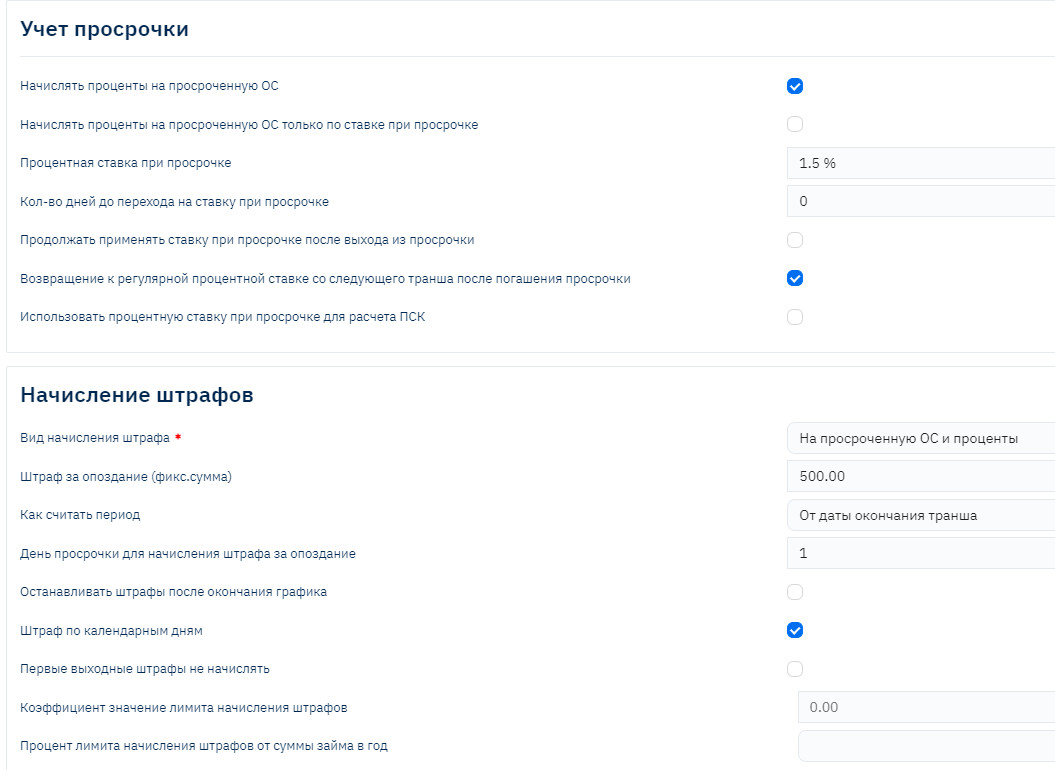
The credit product provides variability of settings for interest accrual in case of overdue.
Application of "Overdue Rate" in Various Combinations
Overdue Rate – is usually used as an additional "penalty" measure and differs from the main product rate upward.
For the client, the main product rate is announced as preferential until the moment of going overdue. When going overdue, the "non-preferential" rate is applied.
At the same time, the ability to configure conditions for switching to the overdue rate and returning to the preferential - main product rate is provided
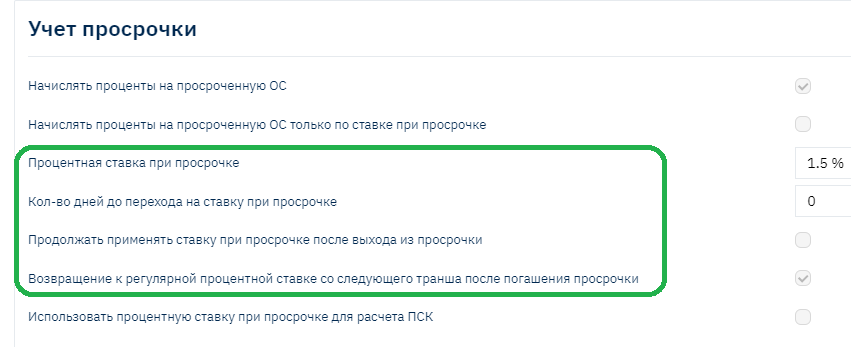
Important! Setting combinations can produce different system behavior results, several cases are described below.
Accrue Interest on Overdue Principal

When the flag is set, interest for all combinations of Residual and Combined interest calculation methods will be accrued from the principal balance in the client's hands, i.e., from the actual Principal debt, not according to the scheduled schedule. (When Principal is overdue - the interest amount will be accrued more than according to the Schedule).
For example:
| Tranche | Principal | Interest | Interest Accrual Base |
|---|---|---|---|
| 03/10/24 to 04/10/24 | 50,000 | 2,000 | 140,000 |
| 04/10/24 to 05/10/24 | 47,000 | 5,000 | 90,000 |
| 05/10/24 to 06/10/24 | 43,000 | 7,000 | 43,000 |
| Total | 140,000 |
With the "Accrue Interest on Overdue Principal" flag:
When Principal is overdue on the first tranche (client did not make 50,000 on 04/10/24), interest in the period from 04/11/24 will be accrued from the actual balance (140 thousand), not from the scheduled (90 thousand)
Without the "Accrue Interest on Overdue Principal" flag:
When Principal is overdue on the first tranche (client did not make 50,000 on 04/10/24), interest in the period from 04/11/24 will be accrued from the scheduled balance (90 thousand).
Case Description with "Accrue Interest on Overdue Principal at Overdue Rate" Setting
- If in the credit product:
• "Accrue Interest on Overdue Principal" - "yes"
• "Overdue Rate" - specified (different from the regular rate)
• "Accrue Interest on Overdue Principal at Overdue Rate" - "yes"
• "Number of Days Until Switching to Overdue Rate" - value not equal to "0"
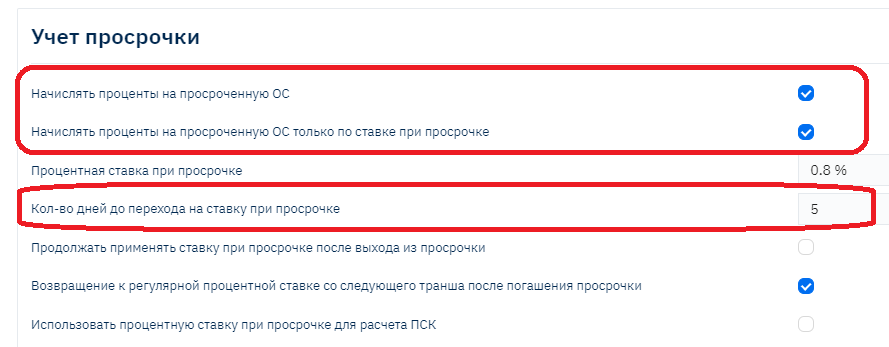
The setting allows providing the client a period after the payment date during which the interest rate remains regular, and interest continues to accrue from the scheduled amount, i.e., we give the client 5 days to make the payment without introducing "sanctions" for overdue.
Example:
Regular rate (if no overdue) - 20% annual
Interest rate for overdue - 35% annual
Schedule:
| Tranche | Principal | Interest | Interest Accrual Base |
|---|---|---|---|
| 03/10/24 to 04/10/24 | 50,000 | 2,000 | 140,000 |
| 04/10/24 to 05/10/24 | 47,000 | 5,000 | 90,000 |
| 05/10/24 to 06/10/24 | 43,000 | 7,000 | 43,000 |
| Total | 140,000 |
If the "Accrue Interest on Overdue Principal Only at Overdue Rate" flag is not set (no checkmark) and "Number of Days Until Switching to Overdue Rate" = 0, then interest will be accrued according to the conditions described in the first example (description of how the accrue interest on overdue principal flag works)
With flags as in the screenshot:
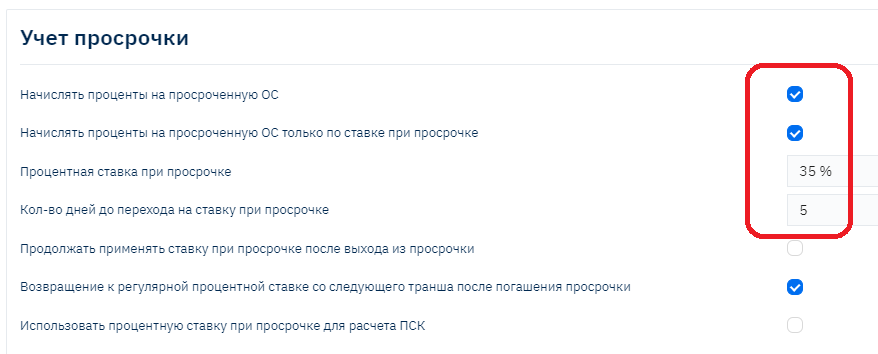
If the client does not make the payment on 04/10/24 for Principal (50 thousand), during 5 days from 04/11/24 to 04/15/24, interest will be accrued from the scheduled balance (90 thousand) and at a rate of 20% annual.
If the client still does not make the payment or repays the tranche debt only partially, from 04/16/24 interest will be accrued at the overdue rate of 35% from the actual balance (140 thousand)
- If in the credit product:
• "Accrue Interest on Overdue Principal" - "No"
• "Overdue Rate" - specified
• "Accrue Interest on Overdue Principal at Overdue Rate" - "yes"
• "Number of Days Until Switching to Overdue Rate" - value not equal to "0"
Due to the fact that the product does not have the "Accrue Interest on Overdue Principal" flag, and all other flags are present, when overdue occurs, interest will be accrued from the scheduled Principal debt amount, after the specified number of days until switching to the overdue rate
Example:
Regular rate (if no overdue) - 20% annual
Interest rate for overdue - 35% annual
Schedule:
| Tranche | Principal | Interest | Interest Accrual Base |
|---|---|---|---|
| 03/10/24 to 04/10/24 | 50,000 | 2,000 | 140,000 |
| 04/10/24 to 05/10/24 | 47,000 | 5,000 | 90,000 |
| 05/10/24 to 06/10/24 | 43,000 | 7,000 | 43,000 |
| Total | 140,000 |
When overdue occurs on the first tranche from 04/11/24 to 04/15/24, interest will be accrued from the scheduled Principal amount (90 thousand) at 20% rate
From 04/16/24, interest will continue to accrue from the scheduled Principal accrual base (90 thousand), but at the increased overdue rate – 35%
Fines
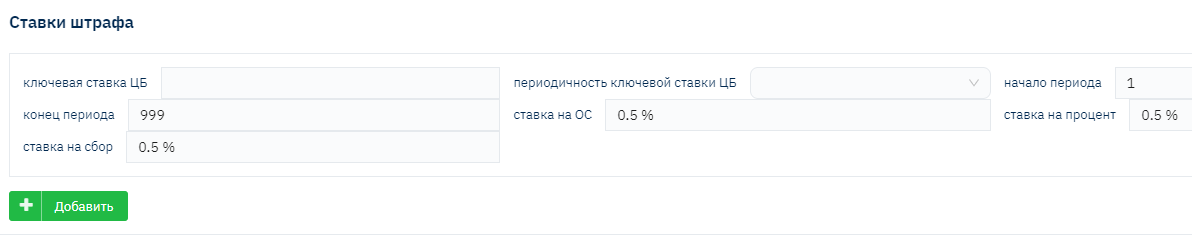
Brainysoft software provides the ability to configure calculation and accrual of Fine amounts as a fixed one-time amount when overdue occurs (Late Fee), as well as calculation for daily Fine accrual at the specified rate. This can be a collection of rates – for different overdue periods, rates may differ.
Important! A large number of possibilities are provided for configuring penalty sanctions for the contract, but it is important to consider current restrictions in the Region for their application.
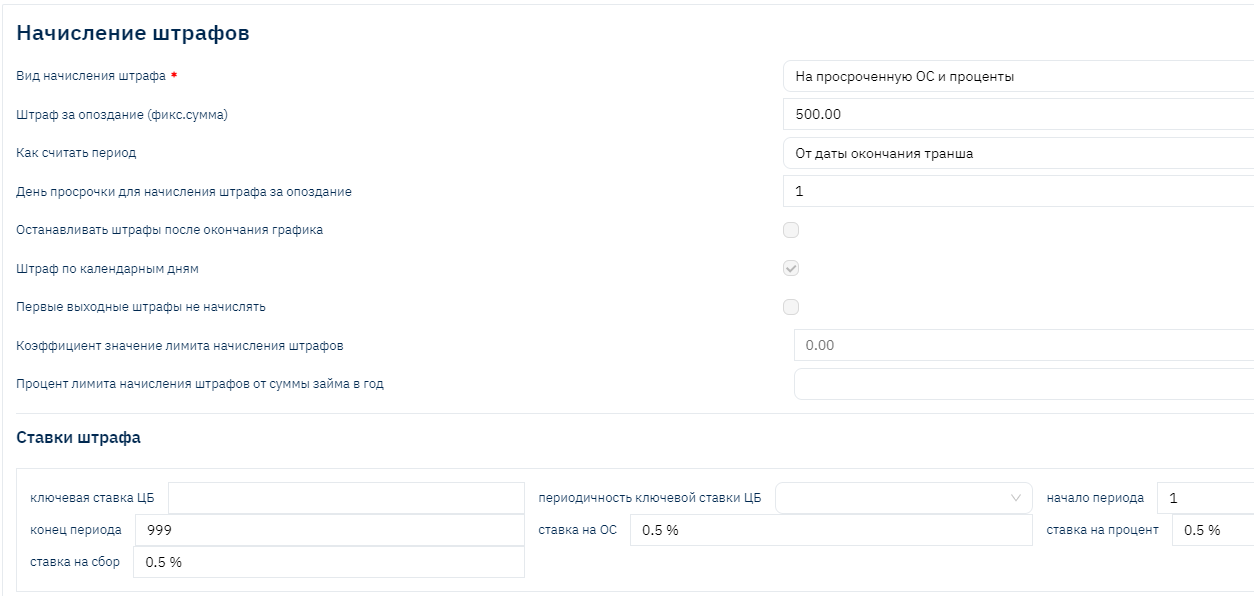
Fine calculation and accrual primarily depend on the Fine amount accrual base specified in the settings in the field
"Fine Accrual Type"
Possible value options:
On Disbursed Loan Amount – daily fine calculation will be made from the Principal disbursement amount, regardless of whether payments were made for its repayment, and regardless of the overdue Principal amount
On Disbursed Loan Amount and Overdue Interest – differs from the previous calculation method in that overdue interest is added to the accrual base
On Overdue Principal – the accrual base is only the actually overdue Principal amount
On Overdue Principal and Overdue Interest – the accrual base is overdue Principal and overdue interest. The most popular and "fair" calculation option, understandable for the client and regulatory authorities
On Residual Balance – regardless of the overdue Principal amount, the Principal balance in the client's hands is used as the accrual base
"Fine Rates" Collection
In the collection, you need to specify:
Start and end period for fine accrual (overdue day for start and end of accrual)
Rates for each separate debt type: Principal, Interest, Fees (charges if present in product settings and corresponding "accrue fine" setting). The specified rate is applied as "Daily Rate".
For convenient calculation based on annual rate (for example, for Russia, the restriction of no more than 20% per year is relevant), automatic calculation of the daily rate based on the specified "Central Bank Key Rate" is provided
Late Fee
Used to configure one-time accrual when overdue occurs. For example, when the client is given the opportunity to pay the debt without a fine for the first few days, but if the client does not repay the overdue during this period, a late fee is accrued to compensate for previously unaccrued fines
You need to specify the Amount and the Overdue Day for its accrual.
Off-Balance for Overdue
Additionally, Brainysoft software provides the ability to configure and account for fines or interest "off-balance" starting from a certain or first overdue day, until the client makes a payment amount sufficient to repay the debt (transferring the amount from off-balance to balance and repaying the amount paid by the client).
The setting is specified in a separate section "User Constants":

Used when permitted by regulatory authorities in the Region, to reduce accruals in the balance, thereby reducing the taxable income base.
Payment Receipt and Distribution Conditions
Due to the fact that payment acceptance nowadays most often occurs online, there was a need to automate the payment distribution process. At the same time, conditions may differ for different loan types:
For example:
For PDL – auto-prolongation subject to payment of current interest
For Installment – partial early repayment conditions or accounting for a payment made early or with an excess amount
For POS – schedule recalculation subject to payment for additional services, etc.
Additionally, if various types of fees or other debt types are provided for the contract, the question of their repayment priority arises
In this regard, several tools have been developed that allow full automation of all necessary conditions
Repayment Priority Configuration (Constructor)
A tool that allows adding new repayment orders (priorities) for contract debt amounts
Debts can be repaid vertically and horizontally:
Example #1. Horizontal repayment order: (i.e., horizontally starting from the "oldest" tranche) First Interest, then Principal, then Fines:

Example #2. Vertical repayment order: (i.e., vertically starting from the "oldest" tranche). First all previously accrued but unpaid Interest, then Principal on tranches where the payment date has arrived, then Fines:

In the constructor, you can create a new Repayment Order, create queues within it and specify for them:
- Queue priority and rules
- All used debt types within the queue
- Repayment priority separately for overdue tranches, current and future. In some cases, priority for each period may differ. For example, for overdue tranches – vertical, for current and future – horizontal
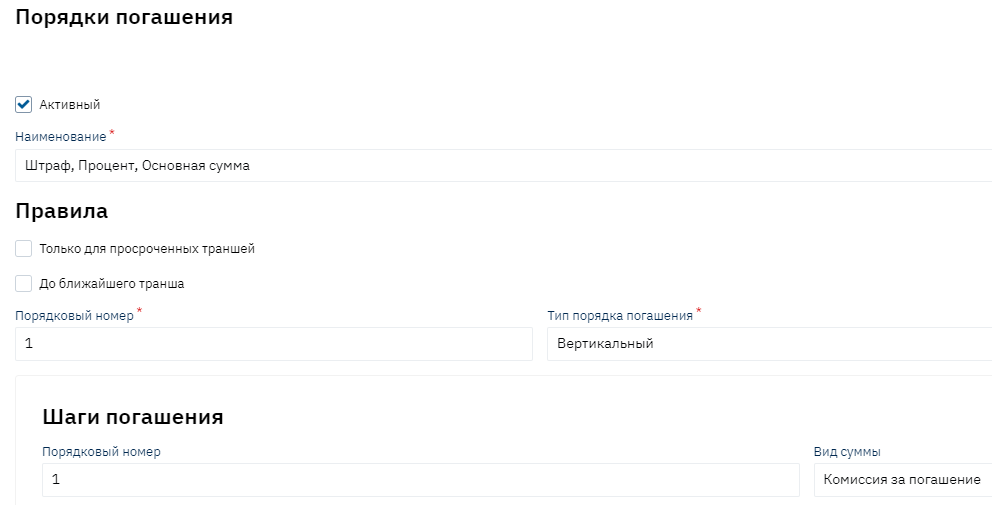
Examples of configured orders:
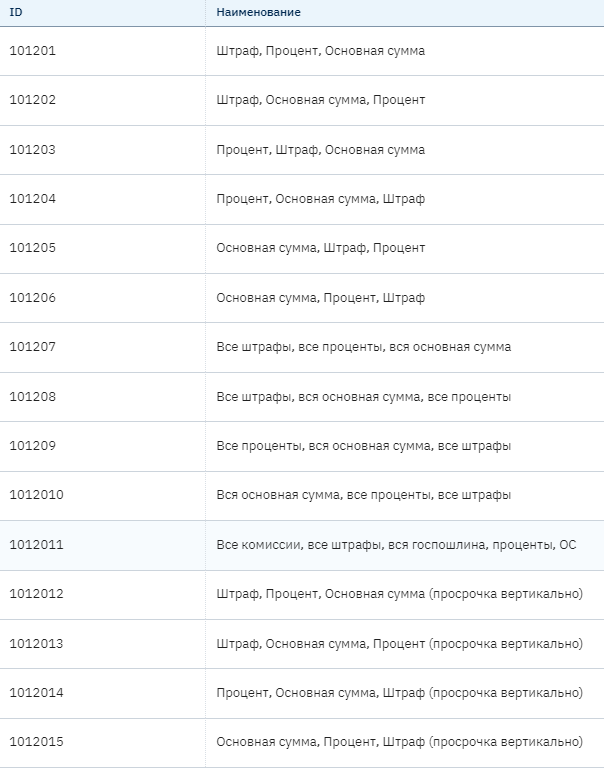
Prepayment Accounting (Payments Made in Excess or in Advance)
Considering that the most popular interest calculation methods are annuity or combined (differentiated), where the interest accrual base is the actual Principal balance in the client's hands, when making early repayments, the Principal amount decreases, and accordingly the accrued interest amount decreases, the "Prepayment Accounting Module" functionality is in high demand.
Most often, the loan agreement specifies payment acceptance conditions: if a payment is made early or for a larger amount, it remains on the client's balance as Prepayment, in other words, as an advance payment until the scheduled payment date arrives.
On the scheduled payment date, timely accrual of scheduled interest and fees occurs, after which "Prepayment Credit" occurs against repayment of current debts (reducing the prepayment amount and reducing Principal, Interest, fee debts by the same amount).
Due to the fact that different types of amounts can act as debt: Principal, Interest, Fees, for their repayment from prepayment, configuration of credit order/priority is also required.
The program has 5 prepayment credit methods pre-configured:

A constructor for creating new credit methods if needed is also provided.
The loan agreement may specify other early repayment conditions, for example, the need to submit an Application for partial early repayment, upon fulfillment of which early debt repayment and schedule recalculation with a change in payment amount or loan term occurs.
Applications for Partial Early Repayment
Brainysoft software provides functionality for submitting an Application for partial early repayment

Upon fulfillment of the conditions (the client making the required amount before the designated execution date), the schedule is recalculated.
Auto-Acceptance
Auto-acceptance allows automating any conditions and rules for payment distribution for different contract types in the system simultaneously.
A mandatory configuration module for automatic payment distribution (acceptance), which specifies rules for contract types:
- credit
- deposit
- share
When payments are received or disbursed (cash flow type):
- Income
- Expense

In each separate rule, you can specify conditions for triggering certain processes and operations.
For example, the Prolongation process triggering rule:

- Sequence of rule verification and execution
- Loan type check (PDL – number of tranches = 1)
- Check for required prolongation parameter in the contract (prolongation term)
- Check payment date correspondence with prolongation conditions
- Check payment amount sufficiency to pay the current Interest and fine debt amount
If this check is successfully completed at the time of payment creation, the necessary operations for conducting prolongation on the contract will be launched:
- Processing with interest accrual
- Repayment
- Prolongation
Thus, any conditions for checking client, contract status, debt amount, availability of this or that process for the contract can be set, as well as checking the payment itself for compliance and launching the necessary operations for payment processing (acceptance)
More examples
- Change repayment order during credit holidays (do not account as prepayment, but make early Principal repayment)
- If the contract has a "Legal" flag, launch the Repayment process, and Prepayment Repayment, i.e., make early repayments.
- If the amount is sufficient, make full loan repayment with interest accrual for the current tranche
- In the first 14 days from the disbursement date, make early repayment without checking for an Application for partial early repayment
Grace Conditions
Prolongation and Restructuring as Methods of Changing Contract Terms
Prolongation. Advantages and Disadvantages
Loan prolongation (from English long) – is an extension of the loan repayment term for a longer period. Prolongation terms can be different but usually do not exceed the loan agreement term. Prolongation is most often used for PDL loans (payday loans, terms up to 30 days).
Advantages of Prolongation
Loan agreement prolongation gives the borrower these advantages:
• no lawsuits and lengthy dealings with collection agencies;
• the ability to gradually return the borrowed money;
• no penalty sanctions from the bank;
• maintaining a positive credit history;
• good relations with the creditor.
The ability to extend the loan in itself makes life easier for consumers. The awareness that in case of unforeseen circumstances, one can defer payment, gives freedom and peace of mind.
As for the creditor, the advantages of prolongation are obvious: the company does not lose money. Although clients extend the repayment term, they still continue to cover the interest rate. By providing such favorable conditions to borrowers, credit organizations primarily protect themselves from court proceedings and endless calls to debtors asking for money back.
What is the Difference Between Prolongation and Restructuring
Loan debt restructuring is measures aimed at the borrower repaying loans under more convenient conditions and in a favorable mode, including using other lending mechanisms.
In lending, loan restructuring is commonly understood as any change in loan conditions that improves the situation for the borrower. Loans may not be classified as restructured if the provisions of the original agreement provide for the possibility of changing its essential terms and simultaneously determine the parameters of such changes and the circumstances under which they are made (except for deterioration of the borrower's financial position), and if the actual change in essential terms was made in compliance with the provisions of the original agreement.
Facts of loan restructuring (changing the essential terms of the original loan agreement in a direction favorable to the borrower) are:
• extension of principal repayment terms;
• increase in principal amount;
• reduction of the loan interest rate, except for interest rate changes in accordance with contract terms.
One of the facts of loan restructuring is extension of principal repayment terms (extension of the loan term by issuing a practically new loan in place of the old one) - loan prolongation.
An MCC can not only extend the loan repayment term, as in the case of prolongation, but also write off part of the debt or change the payment amount. Borrowers can also agree to repay part or the full debt amount by transferring some property to the financial institution's ownership.
You can order the restructuring service both on the eve of the contract end date and after the overdue has occurred. Things are different with prolongation. This service cannot be ordered after the contract term expires. That is, if you must repay the loan by the 10th of the current month, then prolongation must also be processed by the 10th.
For restructuring, you need to request MCC approval in writing and provide evidence that you really cannot settle your debt obligations. A certificate of disability will work as evidence.
In the case of prolongation, creditors are more loyal to borrowers. An application can be submitted in your personal account or on the MCC's official website. No certificates or legal assistance are needed, so the service can be processed in a couple of clicks.
It is worth remembering that restructuring and prolongation must be reflected differently in accounting. For restructured contracts, there is a need to calculate Reserves.
Useful information: https://wiseeconomist.ru/poleznoe/58371-buxgalterskij-uchet-operacij-restrukturizacii-ssud
Prolongation in Brainysoft Software
In Brainysoft software, prolongation technically occurs as a Schedule change within one contract, through the "Prolongation" or "Prolongation with Interest and Fine Transfer" process.
The process consists of several operations:
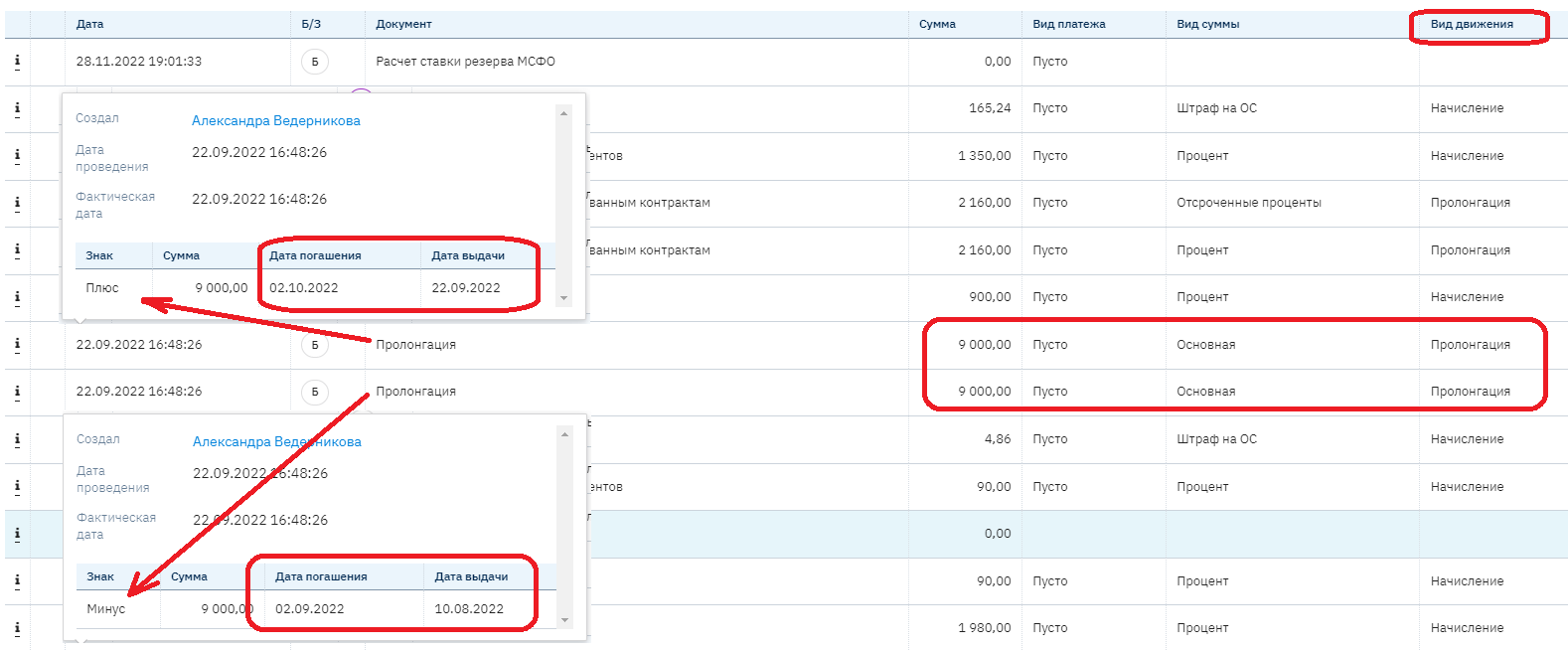
- Transfer of Principal from the old term (tranche) to the new term (tranche), through the "Prolongation" movement type, with "minus" and "plus" signs respectively:
- Transfer of unpaid interest and fines to the new term as "Deferred" if necessary, also by the Prolongation movement type:
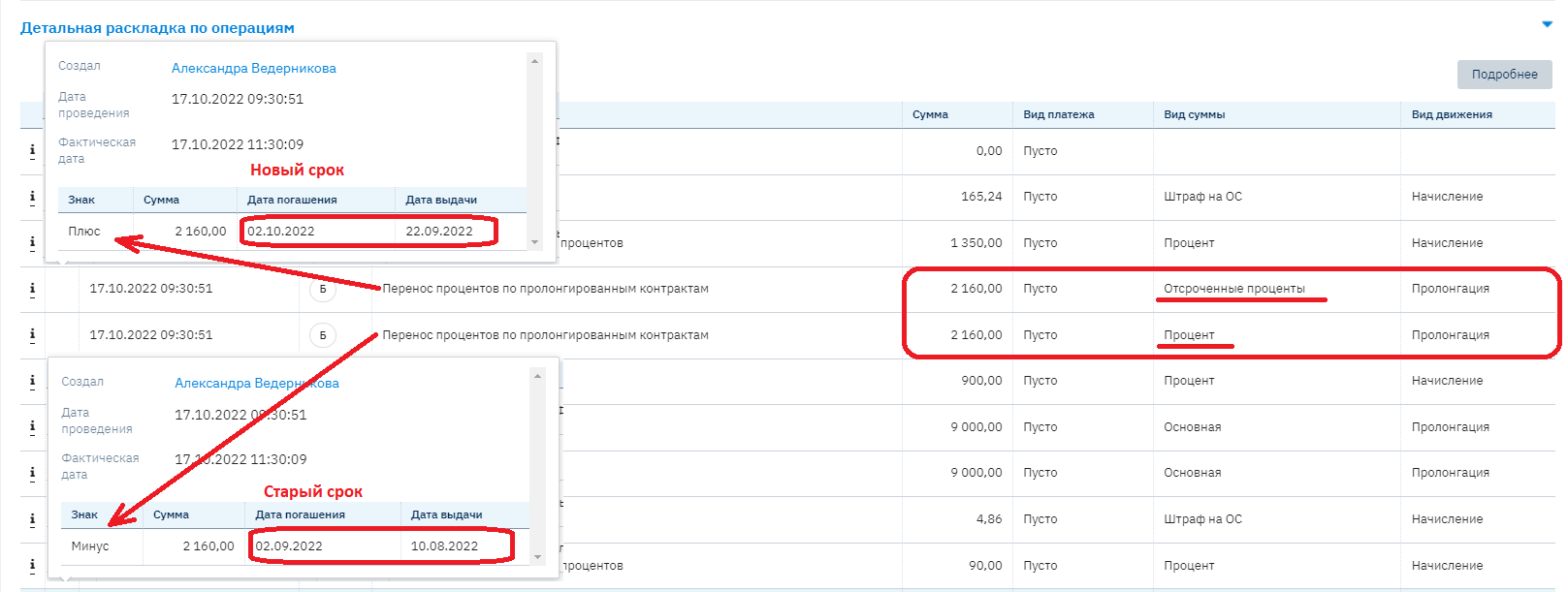
If the "Prolongation with Interest and Fine Transfer" process is used, and at the time of prolongation there are unpaid interest and fines subject to transfer, then the "Transfer of Interest on Prolonged Contracts" Document triggers, which is part of the process.
If prolongation was made before the scheduled payment date, then on the scheduled payment date, the "Transfer of Interest on Prolonged Contracts" document should work, which is part of the Contract Processing process (configuration required!)
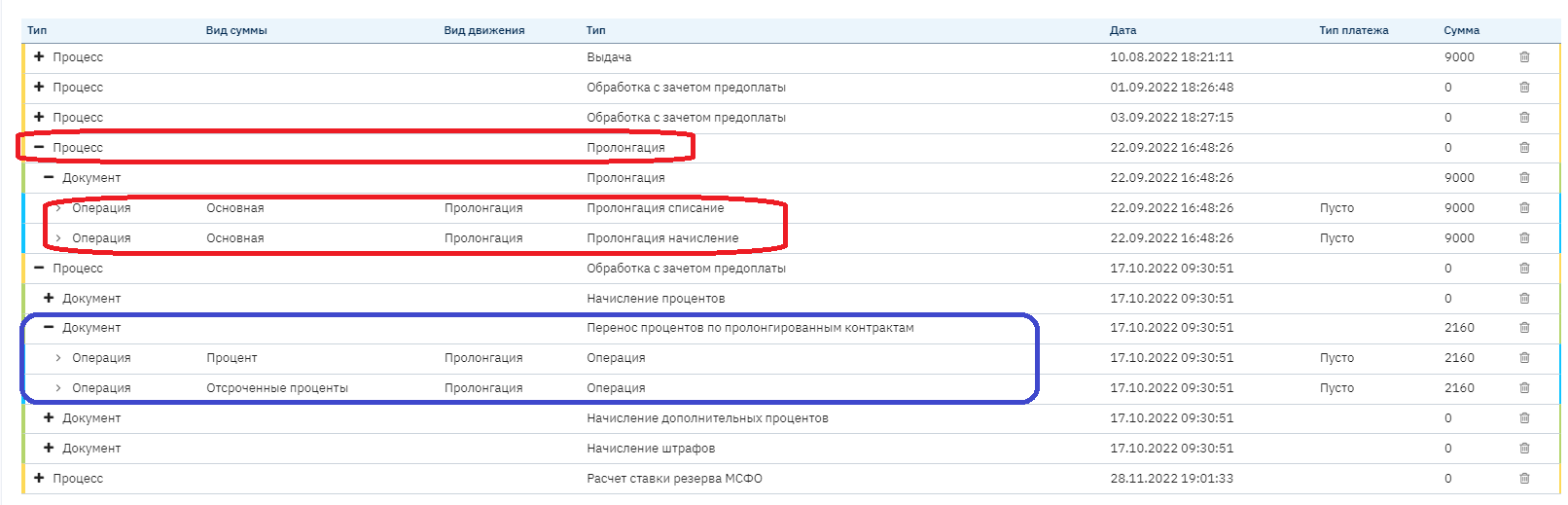
Since overdue is determined by the presence of debt on a tranche with a payment date that has already arrived, and during prolongation the debt is transferred to a new (future) term (tranche), the existing overdue during prolongation is reset to zero and the contract moves to Regular status (exits overdue if present).
This is how the Borrower's positive credit history is preserved.
Brainysoft software provides two types of prolongation
Prolongation from the term end date
Early prolongation
Prolongation from the Term End Date
When configuring this type of prolongation - the new term (value specified in the Prolongation Term field) is added to the previous loan term.
Considering the current limitation on the number of prolongations performed – this type of prolongation is considered the most optimal.
Example #1:
A loan was issued for 20 days from 01/05/22 to 01/25/22 for 10,000 rubles, at a rate of 1%
According to the contract terms, the Borrower pays the accrued interest amount as of the current date - 01/25/22 – 2,000 rubles, for prolongation for another 20 days.
At the same time, the Principal repayment date is transferred to 02/14/22 (01/25 + 20 days)
New schedule as of 01/25/22:
| Tranche Start Date | Tranche End Date | Principal | Interest |
|---|---|---|---|
| 01/05/22 | 01/25/22 | 0 | 0 |
| 01/25/22 | 02/14/22 | 10,000 | 2,000 |
| Total | 10,000 | 2,000 |
Example #2:
A loan was issued for 20 days from 01/05/22 to 01/25/22 for 10,000 rubles, at a rate of 1%
According to the contract terms, the Borrower pays the interest amount as of the current date 01/20/22 – 1,500 rubles (interest amount for 5 days), for prolongation for another 20 days. At the same time, the Principal repayment date is transferred to 02/14/22 (01/25 + 20 days)
New schedule as of 01/20/22:
| Tranche Start Date | Tranche End Date | Principal | Interest |
|---|---|---|---|
| 01/05/22 | 01/25/22 | 0 | 500 |
| 01/25/22 | 02/14/22 | 10,000 | 2,000 |
| Total | 10,000 | 2,000 |
Interest for the period from 01/21/22 to 01/25/22 – 500 rubles, will be accrued in the daily accrual process. Since the prolongation additional agreement condition is the transfer of debt terms, and also to prevent overdue on 01/25/22 – the interest amount will automatically be transferred to the new term as Deferred Interest similar to Principal.
New schedule as of 01/25/22
| Tranche Start Date | Tranche End Date | Principal | Interest |
|---|---|---|---|
| 01/05/22 | 01/25/22 | 0 | 0 |
| 01/25/22 | 02/14/22 | 10,000 | 2,500 |
| Total | 10,000 | 2,500 |
Required Settings:
- Automatic Prolongation in BS – relevant if the prolongation condition is only repayment of interest and fine debt, possibly also part of Principal) as of the prolongation date, without the need to sign an additional agreement via SMS!
• Credit Product Settings
• Process Settings
• Auto-acceptance Settings
- Prolongation Controlled by External System (e.g., Personal Account) – relevant if to perform prolongation, the Borrower needs to first sign an additional agreement via SMS or indicate their desire to prolong the loan in another way.
• Credit Product Settings
• Process Settings
• Initiate prolongation via api if all conditions are met
Early Prolongation
With this type of prolongation, the prolongation term is added to the prolongation date, regardless of the current tranche end date
Example #3
A loan was issued for 20 days from 01/05/22 to 01/25/22 for 10,000 rubles, at a rate of 1%
According to the contract terms, the Borrower pays the accrued interest amount as of the current date - 01/20/22 – 1,500 rubles, for prolongation for another 20 days.
At the same time, the Principal repayment date is transferred to 02/09/22 (01/20 + 20 days)
New schedule as of 01/25/22:
| Tranche Start Date | Tranche End Date | Principal | Interest |
|---|---|---|---|
| 01/05/22 | 01/25/22 | 0 | 500 |
| 01/25/22 | 02/09/22 | 10,000 | 1,500 |
| Total | 10,000 | 2,000 |
- Automatic Prolongation in BS – relevant if the prolongation condition is only repayment of interest and fine debt, possibly also part of Principal) as of the prolongation date, without the need to sign an additional agreement via SMS!
• Credit Product Settings
• Auto-acceptance Settings
- Prolongation Controlled by External System (e.g., Personal Account) – relevant if to perform prolongation, the Borrower needs to first sign an additional agreement via SMS or indicate their desire to prolong the loan in another way.
• Credit Product Settings
• Initiate prolongation via api if all conditions are met
Frequently Asked Questions About Prolongation
- Why did prolongation not occur on the contract?
Prolongation may not go through for several reasons, most often these are legislative restrictions; you also need to check the credit product settings, whether prolongation is possible at all for this credit product; check the early prolongation settings; check auto-acceptance.
- Why does the "Prolongation with Interest and Fine Transfer to Deferred" process not work?
The process needs to be added through the support manager.
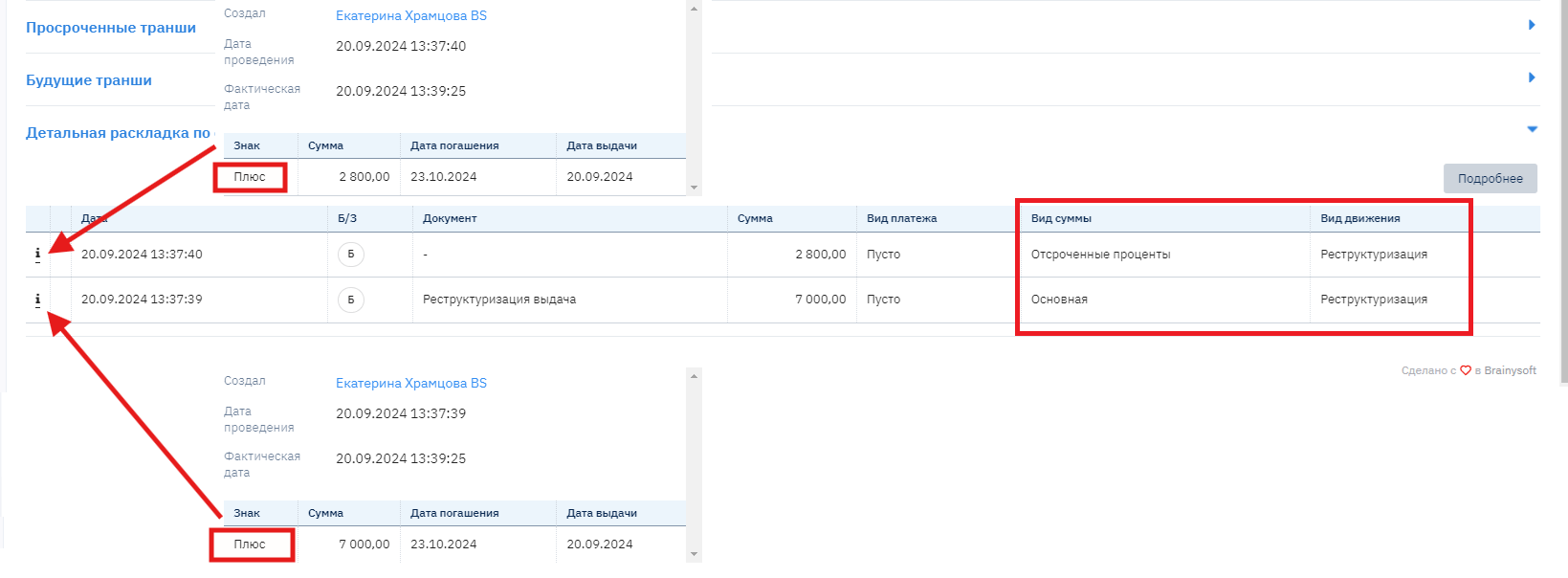
- Why are there two lines with the Prolongation operation in the detailed breakdown?
There are two lines with the "Prolongation" operation in the detailed breakdown of operations because one operation is a write-off from the tranche, and the second is a credit to the new tranche.
Restructuring
The restructuring process allows "closing" the old contract, forming a new contract with new conditions, calculating the schedule, and transferring debt balances to the new contract balance. An additional agreement for new loan terms is signed with the client.
Brainysoft software provides the ability to perform two types of restructuring:
• Contract restructuring with capitalization of accrued but unpaid amounts (interest, fines) on the client's balance
• Contract restructuring with further amount distribution
Contract Restructuring with Capitalization of Accrued but Unpaid Amounts (Interest, Fines) on the Client's Balance.
Restructuring is used to change the terms of the original agreement, for example:
increase in principal amount
change in interest payment schedule
change in interest rate calculation method
extension of principal repayment terms (prolongation can also be used); etc.
To perform restructuring, several actions need to be taken:
- A new loan application needs to be created indicating the remaining funds amount for this contract. IMPORTANT! The contract that is automatically created after application approval must be deleted.
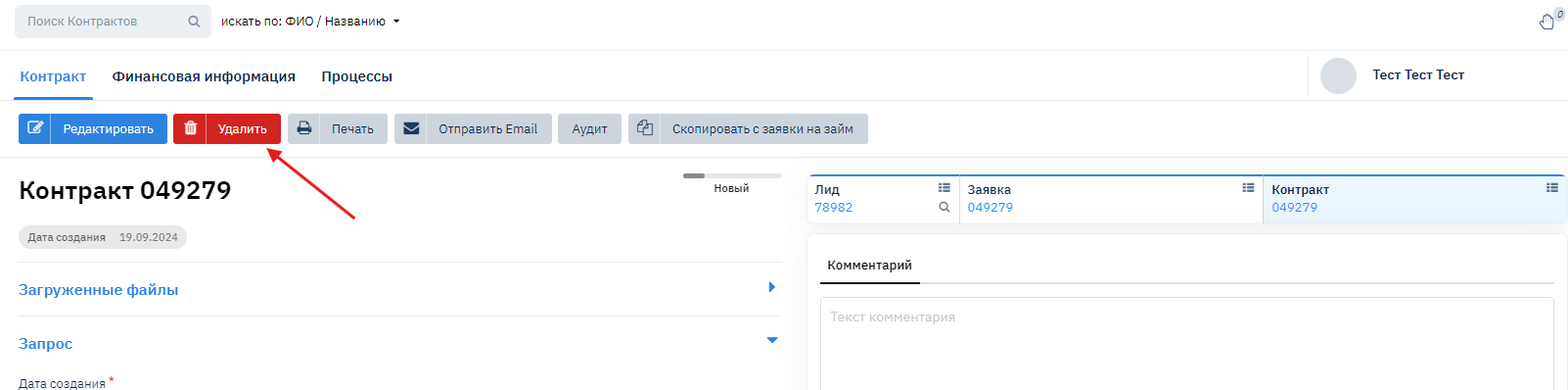
- Next, in the contract's financial information, go to the Contract Restructuring section:

- Complete step 1 and step 2:
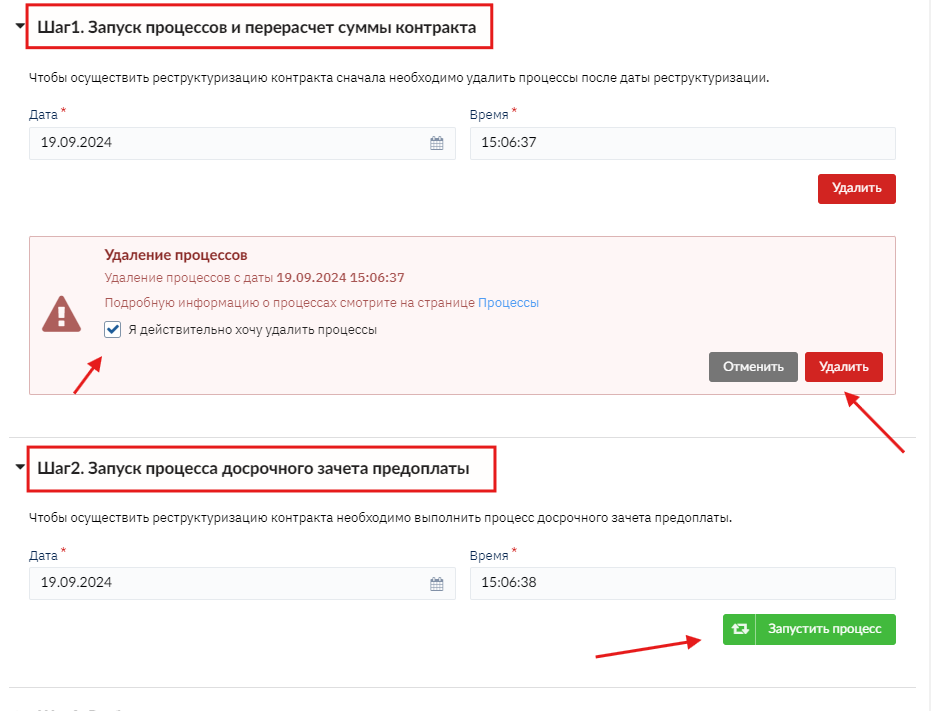
Step 3. Select the previously created application.
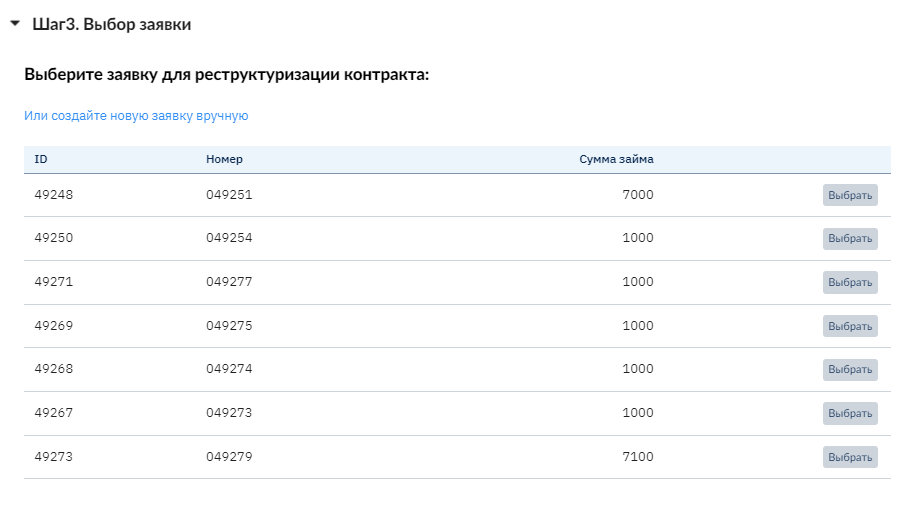
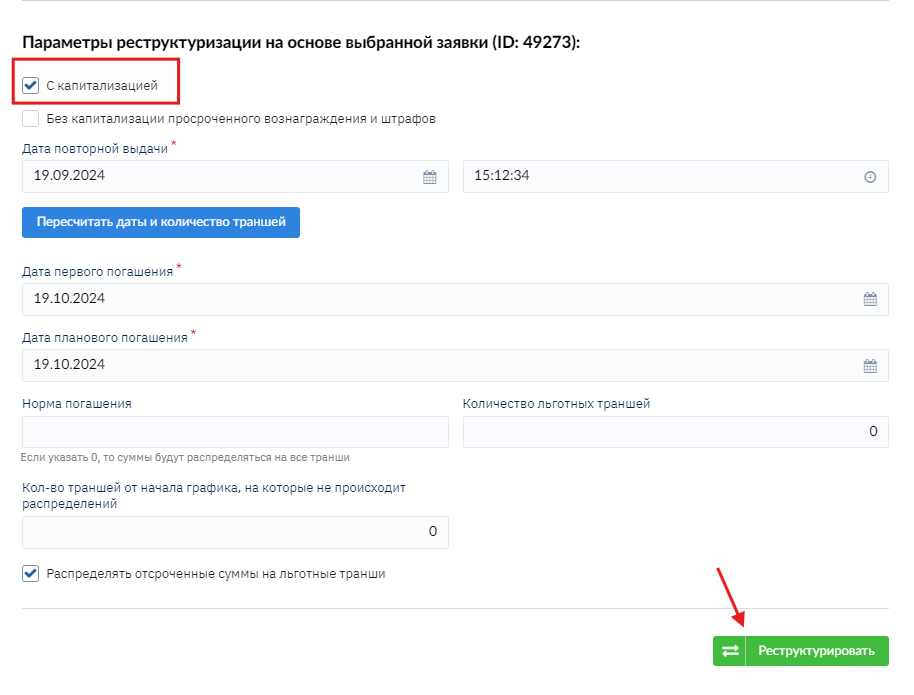
Next, you can specify the first repayment date and the scheduled repayment date if the loan term will differ from what the client previously selected, and click the "Restructure" button.
When clicking the restructure button, the following is formed:
• Contract 2R (the letter R is added to the number) for the selected application and the schedule for it
• A document for "writing off" Principal and Interest from the old contract 2 (Restructuring movement type with a minus sign) and "disbursement" in the new contract 2R (Restructuring movement type with a plus sign)
Writing off from the old contract the entire debt amount:
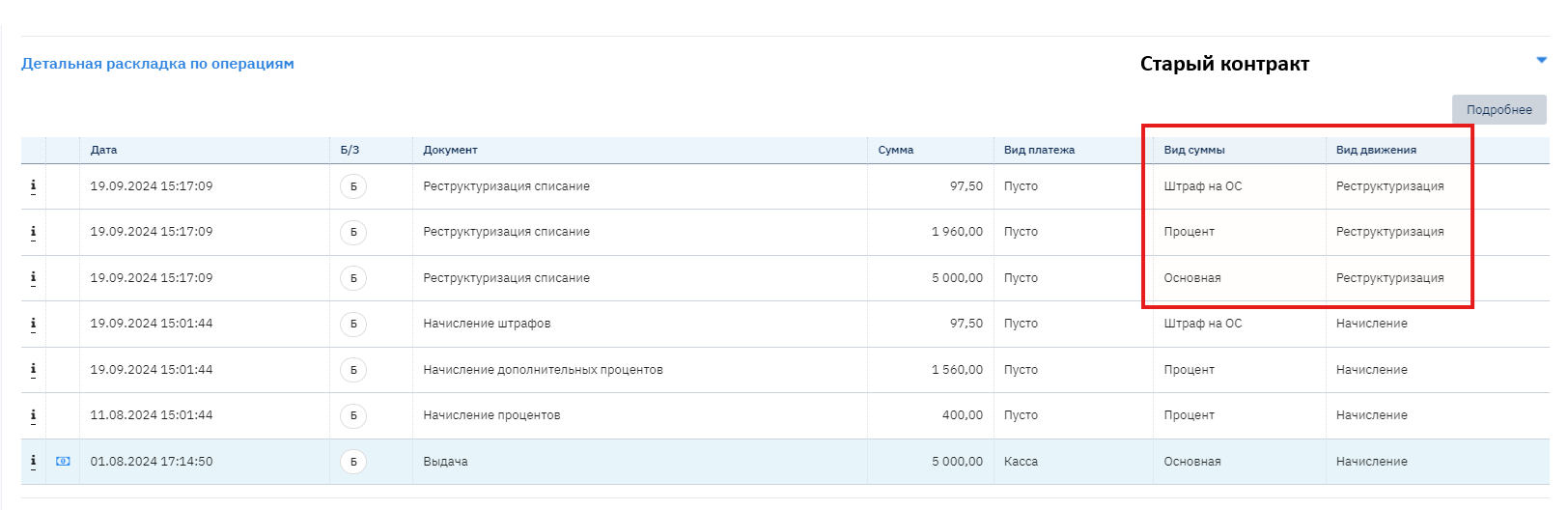
Accrual to the new contract of the same debt amount, but already as Principal:

Contract Restructuring with Further Amount Distribution.
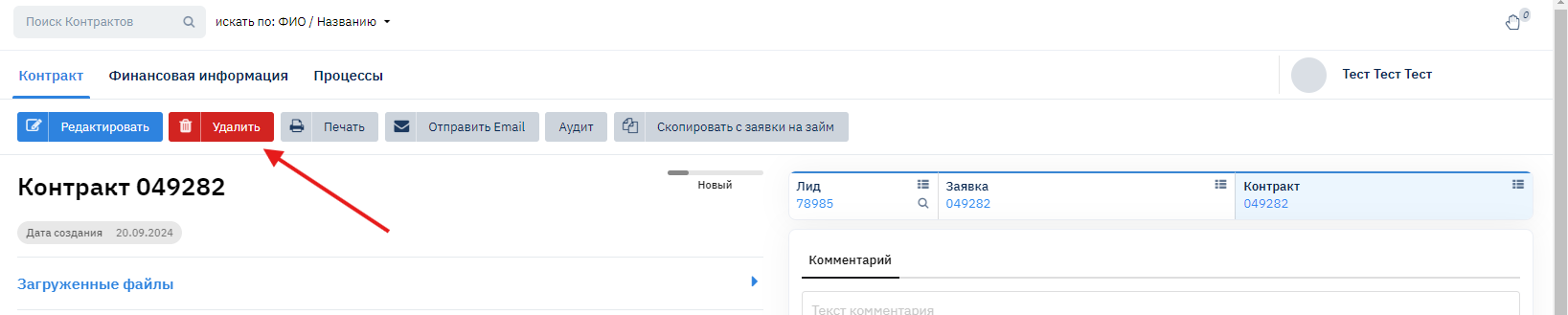
- A new loan application needs to be created indicating the remaining funds amount for this contract. IMPORTANT! The contract that is automatically created after application approval must be deleted.
- Next, in the contract's financial information, go to the Contract Restructuring section:

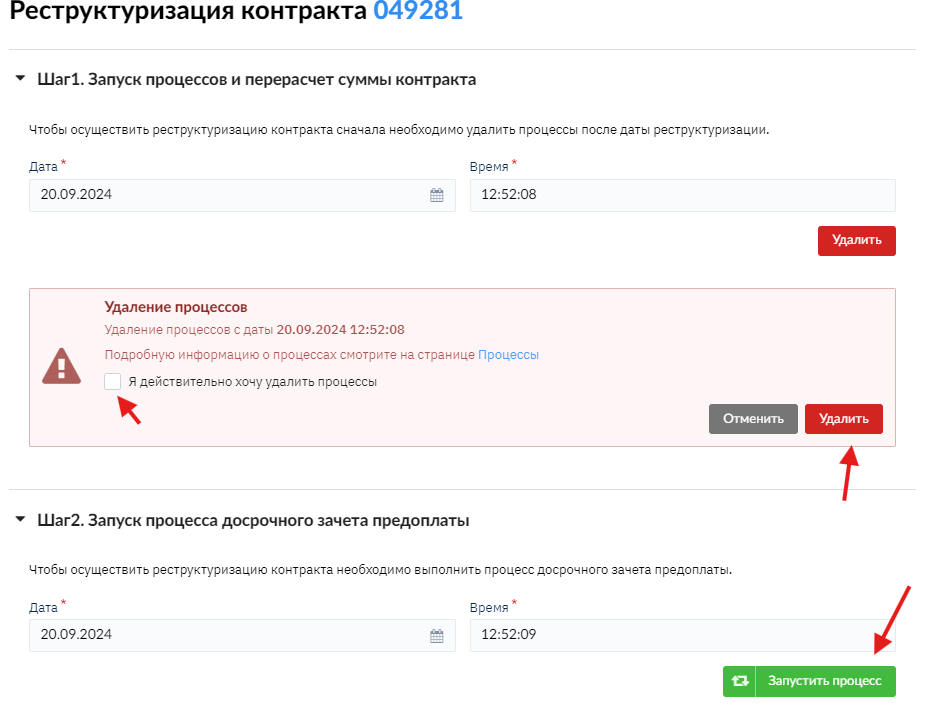
- Run the process for steps 1 and 2.
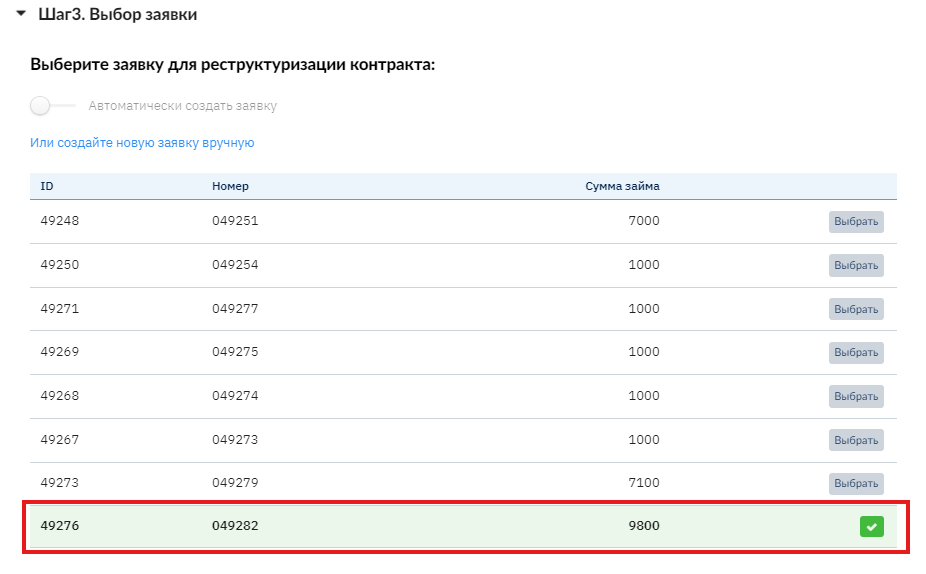
- Step 3. Select the previously created application.
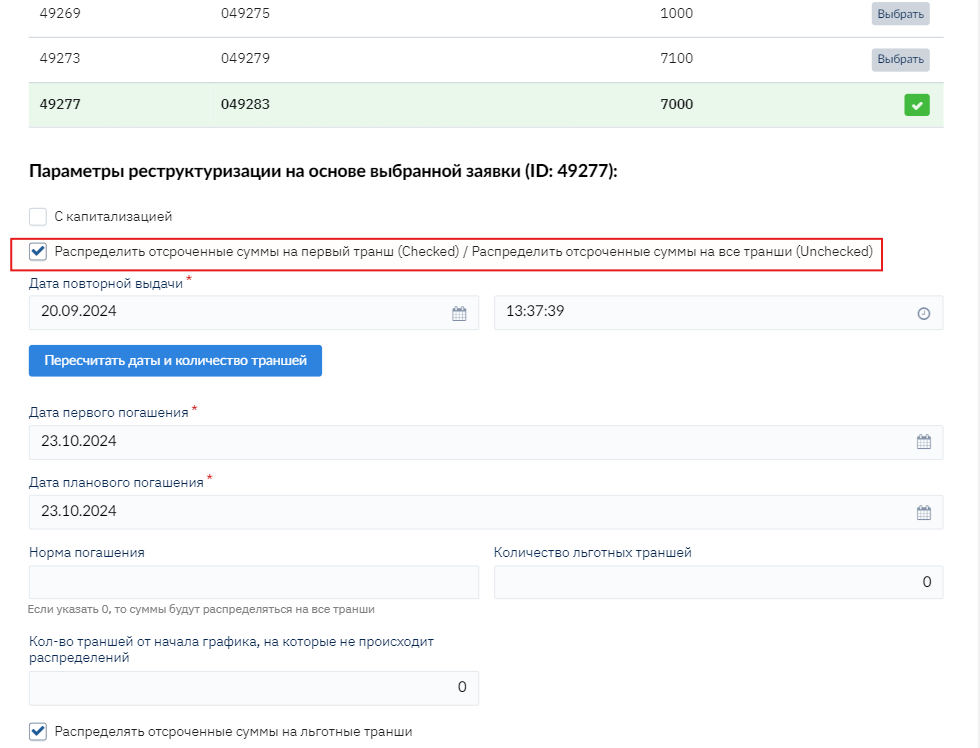
- Specify the restructuring conditions, how to credit deferred amounts and the term:
- Click the Restructure button.
When clicking the Restructure button, the following is formed:
Contract 2R (the letter R is added to the number) for the selected application and the schedule for it
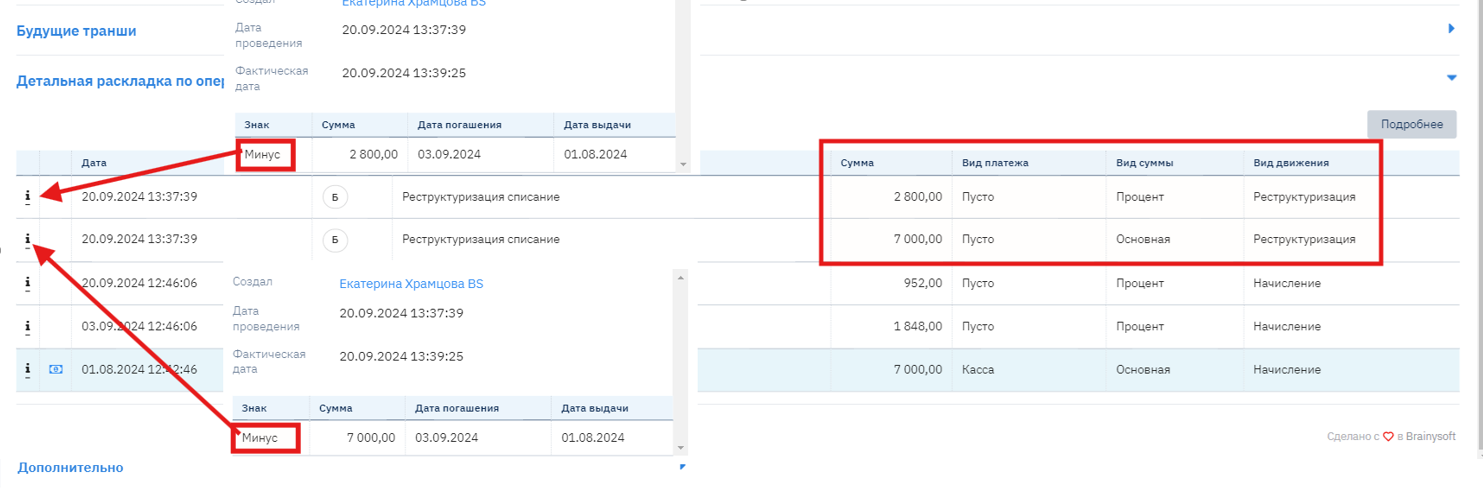
A document for "writing off" Principal and Interest from the old contract 2 (Restructuring movement type with a minus sign) and "disbursement" in the new contract 2R (Restructuring movement type with a plus sign) and interest and fines are recorded as deferred fines and interest
In the old contract, write-off entries are formed:
In the new contract, accrual entries are formed: