

Cumulative - Cumulative on Overdue Loans
Cumulative on Overdue Loans – the report shows the overdue portfolio, can be generated by branches, departments, loan officers, loan products, funding sources, and other groupings.
Report interface:
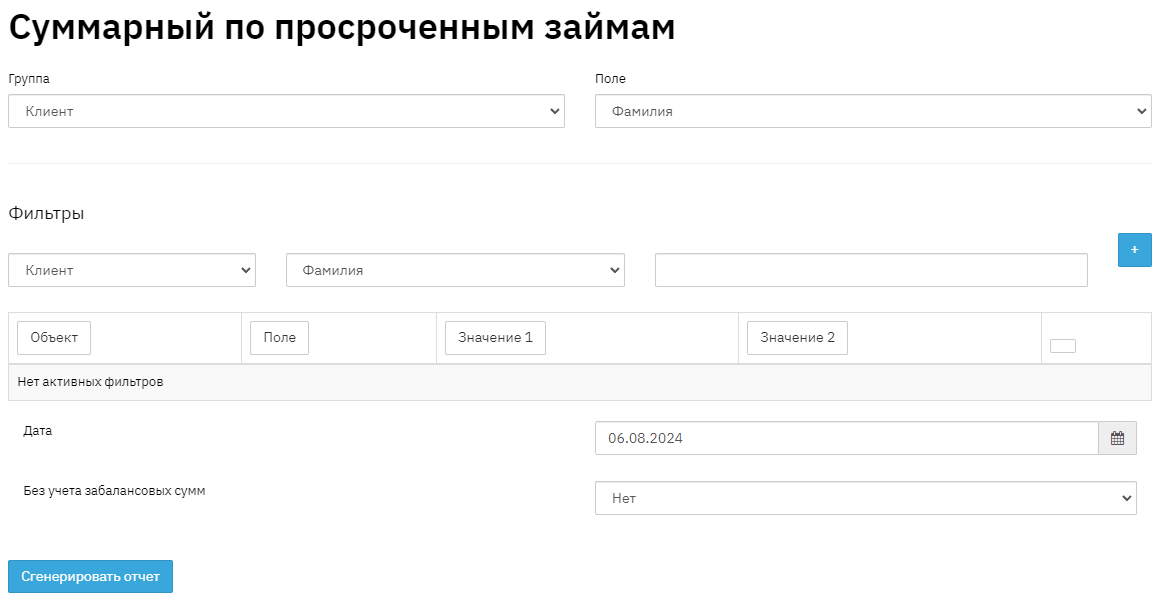
Fill in the report date;
Select the mode with or without off-balance sheet amounts;
Group by: select the required grouping. For example, if you need information by branches, select Object – Contract, Field – Branch; If you need information by funding sources, select Object – Contract, Field – Funding Source, etc;
Filters – if necessary, you can set conditions, for example: by region, branch, litigation/non-litigation cases, by loan amounts, etc. After selecting the conditions, click the "+" button to add a filter;
Click the "Generate Report" button

Amount on hand – balance of the Principal amount of overdue contracts;
Principal overdue – amount of overdue Principal;
Interest overdue – amount of overdue interest;
Penalties overdue – amount of overdue penalties;
Next is the breakdown of the active portfolio (overdue contracts) by days overdue.