

Total - Total for Loans Issued
Total for Loans Issued – the report shows summary data on disbursements for the period, can be generated by branches, departments, loan managers, loan products, funding sources, and other groupings.
The report interface is as follows:
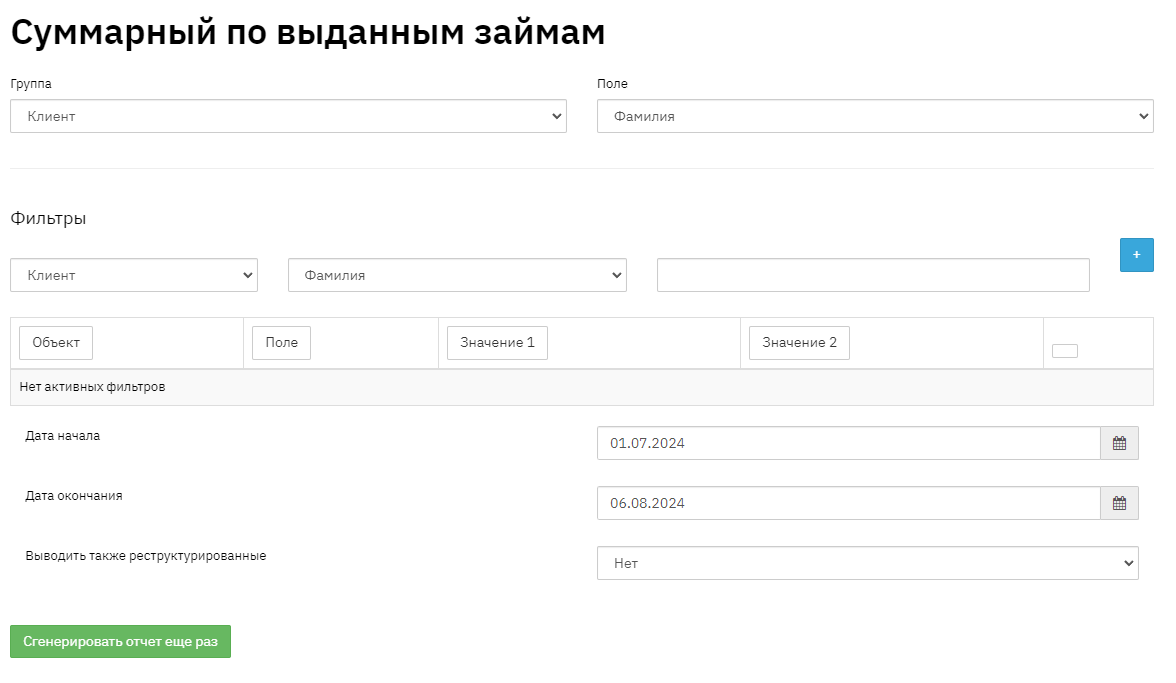
Fill in the report date;
Select the mode with or without off-balance sheet amounts;
Group by: select the required grouping. For example, if you need information by branches, select Object – Contract, Field – Branch; If you need information by funding sources, select Object – Contract, Field – Funding Source, etc.;
Filters – if necessary, you can set conditions, for example: by region, branch, litigated/non-litigated, by loan amounts, etc. After selecting conditions, click the "+" button to add a filter;
Click the "Generate Report" button

The report displays the following data:
· Report period;
· Value – in our example, this is the Branch;
· Number of loans – number of loans issued;
- Share in % - share as a percentage of the total number of disbursements;
- Average loan term – average value by loan term (number of installments);
- Contract amount – total amount by contracts.
- Disbursed amount – total amount disbursed for the reporting period;
- Amount on hand – balance of the Principal amount on issued contracts at the end of the period;
- Average loan amount – average value by loan amount of issued contracts;
- Weighted average rate – weighted average effective interest rate, calculated according to the formula of the Agency for Regulation and Development of Financial Market of the Republic of Kazakhstan;