

Brief Description of the "Credit Product" Module
The "Credit Product" module in BS is a tool for configuring various customer financing conditions (Individuals/Legal Entities/Sole Proprietors/SMB), such as BNPL, Lending for any purposes (PDL, POS, collateral lending), Leasing, Rental, and others. It is possible to configure any payment frequency, use multi-rates for interest calculation within a single schedule, apply various types of penalties and charge additional commissions, and much more. Below is a grouped list of possible settings that affect both the Schedule calculation and the further "servicing" of the Loan Agreement in the program.
Parameters Affecting the Initial Schedule Calculation at the Time of Loan Issuance
To calculate the Schedule, you need to specify:
- Loan term
- Payment frequency and their duration
- Method for calculating the monthly payment amount (Principal, Interest, commissions).
- Interest rates
Combinations of parameters solve the tasks of not only standard calculations, but also providing individual offers to clients.
Possible Schedule Options Using Various Date Calculation Methods
Examples:
Schedule with Monthly Repayments ("Banking" Method)

Weekly Repayments ("Standard" Method)

Payments Every 14 Days (as an Example of Any Frequency)

Repayments at the End of the Month ("By Last Days of the Month" Method)

Short PDL Loan (One-time Payment)
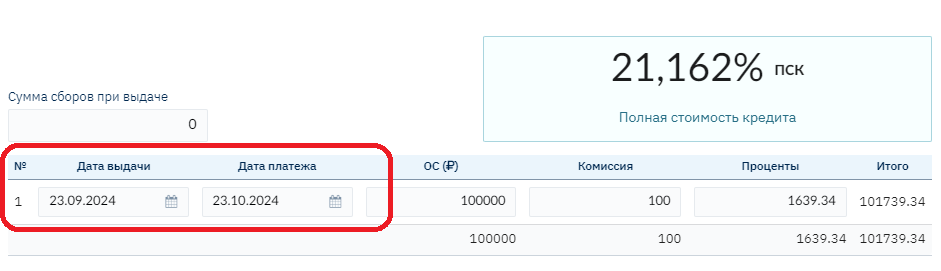
Schedule with Payment Date Transfer from Weekends to Business Days

November 23 and 24, 2024 are Saturday and Sunday, the date was transferred to 25.11.24
23.02.2025 is Sunday, transferred to 24.02.25
23.03.25 is Sunday, transferred to 24.03.25
Important! The final loan term may be extended due to the transfer of the deadline in the last tranche
Schedule with Strictly Limited Term ("Without Offset Consideration" Method)

22.11.2024 + 30 days = 22.12.24, but since this is Sunday, the date is transferred to the next business day 23.12.24
The next payment, to ensure the total loan term of 12 days, is calculated from the planned date before the transfer: 22.12.24 + 30 days = 21.01.25
Client Chooses the Payment Date Themselves
For situations where the client chooses a convenient payment date themselves, the program provides the ability to change the first payment date directly in the contract (on an individual basis). All other schedule dates will be calculated based on the established first payment date:
For example, the client prefers to pay on the 15th of each month:
In the contract, the First Repayment Date field is set to 15.10.24, then all payment dates are calculated for the 15th (provided there is no setting for transfer to business days)

Possible Methods for Calculating Amounts in Schedules (Distribution of Principal and Interest, Type of Interest Rate)
The rate for calculations can be applied in three types: Annual, Per Period, or Daily.
The calculation of the interest amount for each rate type differs and is applied for different business processes in combination with the distribution of Principal and Interest and payment frequency
In addition, for the annual rate, there is an option to calculate the interest amount in different ways per month (relevant for monthly payments)
- German calculation method (360/30). Interest is never accrued on February 28, interest is accrued for 3 days at once.
- English calculation method (365/actual number of days in the month)
- French calculation method (360/actual number of days in the month)
Examples
Methods for Calculating Interest and Principal: Residual (Annuity)

Methods for Calculating Interest and Principal: Residual with Grace Tranches

Methods for Calculating Interest and Principal: Residual with Two Rates

Methods for Calculating Interest and Principal: Residual with Multi-rate and Single Payment Standard
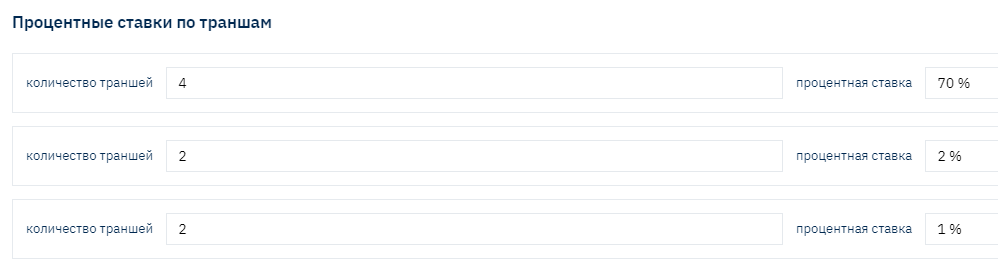

The payment standard (monthly payment amount) was 15025.05 for all tranches, regardless of the specified rate
At the same time, the distribution of Principal and Interest amounts differs significantly: in the first period, the interest amount is significantly higher, and the Principal is lower.
At the same time, the overall product rate may not exceed the current legislative restrictions (APR in Russia).
Methods for Calculating Interest and Principal: Compound Residual

Methods for Calculating Interest and Principal: Simple


Methods for Calculating Interest and Principal: Simple with Two Rates

Methods for Calculating Interest and Principal: Combined (Differentiated)


Methods for Calculating Interest and Principal: Balloon Flexible Schedule
Balloon is a schedule consisting of two annuities. The issuance amount is divided into two required parts and two periods. For each separate period, its own "Payment Standard" is calculated and the distribution of Principal and Interest is according to the annuity. Visually, the Schedule looks like two separate Schedules combined within one contract. The interest rate for both periods is the same.

Methods for Calculating Interest and Principal: Operating Lease

Dates in the schedule are by the last days of the month.
The accrual base for calculating the rental amount is calculated according to the following formula:
The rental fee is calculated according to the following formula:
_Monthly interest amount (Fee) = ("Total cost of car + additional options + insurance + taxes" + "Residual value of car") _ Money rate factor*
Monthly rental payment = (Monthly principal amount (PD) + Monthly interest amount (Fee)) + VAT
Parameters Affecting Further Automatic Loan Servicing by the System Under Various Circumstances:
After the contract is issued, it is considered active. Further accrual of debt amounts occurs in accordance with the conditions specified in the credit product (important! Values are transferred from the credit product to the Contract and saved in the contract fields). If the client makes payments according to the Schedule, the accruals will be equal to the amounts specified in the Schedule. But, under other circumstances, the amounts will differ and depend on the following settings:
- Conditions for overdue payments
- Conditions for Early Repayments
- Conditions for payment distribution (auto-acceptance) depending on various parameters (credit holidays, certain contract or client statuses, etc.)
- Grace conditions
- Prolongation and other types of contract term changes
Configuring these conditions allows you to fully automate the contract servicing process in automatic mode, without the need to manually control states in order to make adjustments.
Penalty Conditions for Overdue Payments
Overdue debt in Brainysoft software is "recognized" or occurs at the moment when the payment date of the debt according to the Schedule arrives - day 0 of overdue.
If the payment is not repaid during the day, the next day the contract is assigned the status "Overdue", and it becomes possible to apply "penalties" pre-configured in the credit product or in a separate contract.
- Increased rate for overdue (with various conditions for application or cancellation)
- Additional accruals of Penalties or fines (fixed or at a rate on all or certain types of debts)
Overdue Rate – is usually used as an additional "penalty" measure and differs from the main product rate upward.
For the client, the main product rate is announced as preferential until the moment of becoming overdue. When becoming overdue, the "non-preferential" rate is applied.
At the same time, it is possible to configure the conditions for switching to the overdue rate and returning to the preferential - main product rate.
"Type of Penalty Accrual", Possible value options:
- On the issued loan amount – calculation of the daily penalty will be made from the Principal issuance amount, regardless of whether payments were made for its repayment, as well as regardless of the overdue Principal amount
- On the issued loan amount and overdue interest – differs from the previous calculation method in that overdue interest is added to the accrual base
- On the overdue Principal amount – the accrual base is only the actually overdue Principal amount
- On the overdue Principal amount and overdue interest – the accrual base is the overdue Principal and overdue interest. The most popular and "fair" calculation option, understandable for the client and regulatory authorities
- On the remaining balance – regardless of the overdue Principal amount, the remaining Principal amount in the client's hands is used as the accrual base
- Fixed amount – on a certain (specified in settings) day of overdue, one-time
- Penalties on commissions
- Different rates for different overdue periods – rate collection
Off-balance Sheet Accounting for Overdue
Off-balance sheet accounting is used if permitted by regulations in the Region, to reduce on-balance sheet accruals, thereby reducing the taxable income base.
Brainysoft software provides the ability to configure and perform off-balance sheet accounting of penalties or interest starting from a certain or the first day of overdue, until the client makes a payment amount sufficient to repay the debt (moving the amount from off-balance to on-balance and repaying the amount paid by the client).
The setting is specified in a separate section "User Constants":

Conditions for Receiving and Distributing Payments
Due to the fact that payment reception nowadays most often occurs online, there is a need to automate the payment distribution process. At the same time, conditions may differ for different types of loans:
For example:
For PDL – auto-prolongation subject to payment of current interest
For Installment – partial early repayment conditions or accounting for payment made ahead of schedule or with an excess amount
For POS – schedule recalculation subject to payment for additional services, etc.
In addition, if the contract provides for various types of commissions or other types of debts, the question of their repayment priority arises
In this regard, several tools have been developed to fully automate all necessary conditions
Setting Repayment Priority (Constructor)
A tool that allows adding new repayment orders (priorities) for contract debt amounts
Debts can be repaid vertically and horizontally:
Example #1. Horizontal repayment order: (i.e., horizontally starting from the "oldest" tranche) First Interest, then Principal, then Penalties:

Example #2. Vertical repayment order: (i.e., vertically starting from the "oldest" tranche). First all previously accrued but unpaid Interest, then Principal for tranches where the payment date has arrived, then Penalties:

In the constructor, you can create a new Repayment Order, create queues within it and specify for them:
- Queue priority and rules
- All types of debts used within the queue
- Repayment priority separately for overdue tranches, current and future. In some cases, the priority for each period may differ. For example, for overdue tranches – vertically, for current and future – horizontally
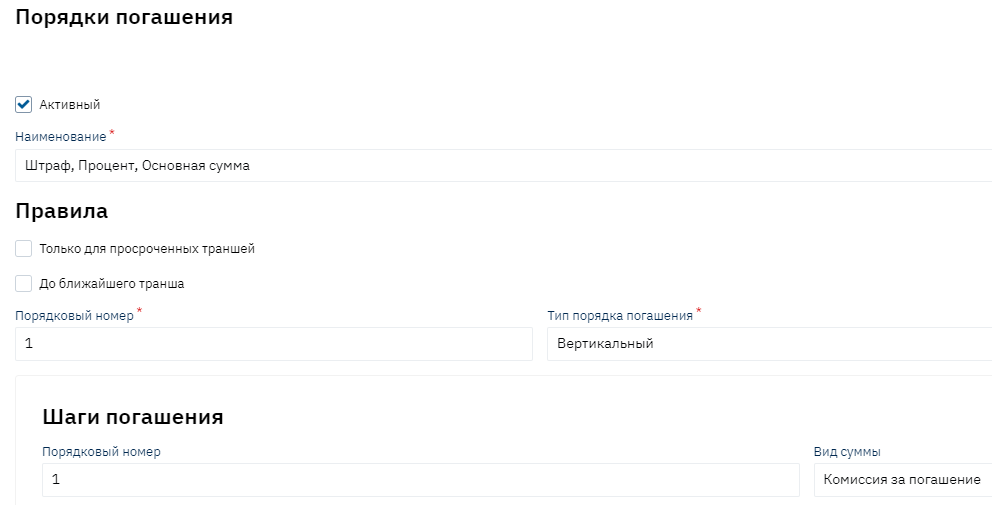
The constructor (directory) is available in user mode with access rights.
Examples of configured rules:

Prepayment Accounting (Excess or Early Paid Payments)
Considering that the most popular methods for calculating interest are annuity or combined (differentiated), where the accrual base for interest is the actual remaining Principal in the client's hands, when making early repayments, the Principal amount decreases, and accordingly the accrued interest amount decreases, the "Prepayment Accounting Module" functionality is very much in demand.
Most often, the loan agreement specifies payment acceptance conditions: if the payment is made ahead of schedule or for a larger amount, it "hangs" on the client's balance as Prepayment, in other words, as an advance payment until the scheduled payment date arrives.
On the scheduled payment date, timely accrual of scheduled interest and commissions occurs, after which "Prepayment Offset" occurs against the repayment of current debts (reduction of the prepayment amount and reduction of debt on Principal, Interest, commissions by a similar amount).
Due to the fact that different types of amounts can act as debt: Principal, Interest, Commissions, for their repayment from prepayment, setting the order/priority of offset is also required.
The program has 5 prepayment offset methods pre-configured:

A constructor for creating new offset methods is also provided if necessary.
The loan agreement may stipulate other early repayment conditions, for example, the need to submit a Partial Early Repayment Application, upon fulfillment of which early repayment of debt amounts and schedule recalculation with a change in payment amount or loan term occurs.
Brainysoft software provides functionality for submitting a Partial Early Repayment Application

Upon fulfillment of its conditions (the client making the required amount by the appointed execution date), the schedule is recalculated.
Auto-acceptance
Auto-acceptance is used to launch processes for Cash Flow based on a specific set of rules. Each rule contains launch conditions and a list of processes that will be launched if the launch conditions are met.
Auto-acceptance allows you to automate any conditions and rules for payment distribution across various types of contracts in the system simultaneously.
Order of Rule Verification
Each auto-acceptance rule (AcceptRule) has, among other things, a sequence number (orderNumber) and a flag for stopping the execution of subsequent rules (lastRule). Launch conditions are checked in each rule in turn. The rule with the lowest sequence number will be checked first (if sequence numbers match, the execution order is undefined). If conditions for launching the rule are met - processes for this rule will be launched. If the rule has a flag for stopping the execution of subsequent rules (lastRule = true) – subsequent rules will not be executed and auto-acceptance will complete its work after executing processes for the current rule (even if no process worked - execution will be completed).
Launch Conditions
For a rule to trigger, the following conditions must be met:
- The contract type in the Cash Flow must match the contract type specified in the rule
credit
deposit
share
- The movement direction in the Cash Flow must match the movement direction specified in the rule
Income
Expense
- The Jexl condition specified in the rule must return true
Each rule must have an expression when the condition is met, in which this rule will be executed. Jexl is used as the scripting language

For example, the Prolongation process trigger rule:

- Sequence of rule verification and execution
- Loan type verification (PDL - number of tranches = 1)
- Verification that the required parameter for prolongation is filled in the contract (prolongation term)
- Verification of payment date compliance with prolongation conditions
- Verification of payment amount sufficiency to pay the current debt amount for Interest and penalties
If this verification is successfully completed at the time of payment creation, the necessary operations for prolongation on the contract will be launched:
- Processing with additional interest accrual
- Repayment
- Prolongation
Thus, you can set any conditions for checking the client's status, contract, debt amount, availability of a particular process for the contract, as well as verify the payment itself for compliance and launch the necessary operations for payment processing (acceptance)
More examples
- Changing the repayment order during credit holidays (do not count as prepayment, but perform early Principal repayment)
- If the contract has the "Litigation" attribute, launch the Repayment process, not Repayment with prepayment, i.e., perform early repayments.
- If the amount is sufficient, perform full loan repayment with additional interest accrual for the current tranche
- In the first 14 days from the issuance date, perform early repayment without checking for a Partial Early Repayment Application